
CLI reference
Every fsp command, the generated file, the editor plugins and fsp dev. For fsp maestro and fsp test, see Route tests.
The generator
fsp create my_app       # a new Flutter app with fespalier in it, ready to run (since 0.15.0)
fsp init                # first-time setup of an existing app: starter files, then gen
fsp add storage         # an optional feature of fsp create, added to this app (since 0.23.0)
fsp gen                 # check lib/app/, write lib/app.g.dart
fsp gen --format        # ...and run `dart format` on it
fsp routes              # print the route table (--json: one object per route)
fsp routes --graph      # the route tree as a Mermaid graph (--graph dot: Graphviz)
fsp routes --graph json # the same tree as JSON (what the DevTools extension reads)
fsp links               # App Links, Universal Links, assetlinks.json and a sitemap from the routes
fsp links --check       # CI: non-zero exit when those files are stale
fsp maestro             # Maestro smoke flows, one per route (since 0.7.0)
fsp maestro --check     # CI: non-zero exit when those flows are stale
fsp size                # the web build's JavaScript per deferred route (since 0.8.1)
fsp size --check        # CI: non-zero exit when a budget in `size:` is exceeded
fsp test                # a widget smoke test per route, in test/routes/ (since 0.8.1)
fsp test --check        # CI: non-zero exit when that file is stale
fsp telemetry           # a local OpenTelemetry stack with fespalier's dashboards (since 0.8.1; needs Docker)
fsp telemetry --grafana # ...and Grafana, with the same dashboards
fsp upgrade             # upgrade fsp the way it was installed (since 0.15.0)
fsp upgrade --check     # exit 0 up to date, 3 an update is available, 1 error
fsp upgrade --app       # move the ref: of fespalier and every companion to this fsp's release (since 0.23.0)
fsp doctor              # what main() wires and why, and what is out of line: refs, lock, go_router, Flutter (since 0.23.0)
fsp schema              # the JSON Schema of the fespalier: section, for editors (since 0.23.0; --pubspec: the whole file)
fsp watch               # same, whenever the routing changes (keep it next to `flutter run`)
fsp dev                 # fsp watch and flutter run in one terminal, hot reloading the app as you save (since 0.9.0)
fsp dev --profile staging  # the same, with the values of config/app.staging.yaml (since 0.24.0)
fsp build web           # fsp gen, then flutter build web, with the hooks of `tasks: build:` (since 0.9.0)
fsp build web --profile prod  # the same, with the values of config/app.prod.yaml (since 0.24.0)
fsp run codegen         # a task of your own from `tasks:` in pubspec.yaml; `fsp run` lists them (since 0.9.0)
fsp run --json          # the same list as JSON lines, for the editor plugins (since 0.22.0)
fsp check               # CI: non-zero exit on errors, writes nothing
fsp new 'products/[id]' --name Product --data --action --loading --error --layout --guard --transition
                        # [id] or :id both mean $id, so no shell quoting of $
fsp new '(account)' --layout    # a (group) folder: layout only, no page.dart
fsp new 'kyc/shop/name' --function --name KycShopName
                        # views as functions (`Widget page()`), with a routeName
fsp new 'shop' --not-found      # not_found.dart (not-found.dart with `file_style: kebab`)
fsp new 'orders' --nav          # nav.dart: how the folder shows in the generated menus (since 0.8.1)
fsp new 'orders/[id]' --observe # observe.dart: onEnter, onFocus and onLeave (since 0.8.1)
fsp new 'orders/[id]/edit' --leave # leave.dart: asked before this page goes; true lets it go (since 0.11.0)
All commands take --project <dir> (default: the nearest folder with a pubspec.yaml). fsp is one native binary, fast enough to run on every save (a full scan, check and emit of an example takes a few milliseconds). Install it as described in Installation and setup; to build it from source, see Development.
fsp new
fsp new writes page.dart plus the kinds you ask for with flags. It skips files that already exist, then regenerates lib/app.g.dart and prints the result line (if that fails, it lists the files it created).
- Class names come from
--name(default: from the path, e.g.ProductsId). A segment that already has a type elsewhere in the tree keeps it. --functionwrites function views instead of classes;--namebecomes therouteName(UpperCamelCase).--no-pageleavespage.dartout.--not-foundadds anot_found.dartthat takes the segments of its path asStrings (see Not-found views).- A
(group)target ('(account)') gets nopage.dart, since a group has no URL of its own. Afterfsp new '(account)' --layoutthe generator warns "folder has no page.dart and no routes below it; skipped" until you add a route inside the group. That is expected.
fsp gen, check and watch also look at the string paths in lib/ (see Checking string paths).
fsp create
Since 0.15.0. fsp create my_app makes a new Flutter app with fespalier in it, and leaves it with a green flutter test:
fsp create my_app                      # the base app: two pages and a layout
fsp create my_app --org com.example --platforms android,ios,web
fsp create my_app --features storage,connectivity   # the base app plus optional features
fsp create my_app --template tabs      # two tabs, as a bar, a rail or a drawer by window width
fsp create my_app --features otel,sentry   # traces and error reports
fsp create my_app --features auth,i18n,image   # signed-in routes, translations, responsive images
fsp create my_app --features http,download     # an http.Client page, downloads that outlive a screen
fsp create my_app --features all       # every optional feature your Flutter runs
fsp create my_app --dry-run            # print every file and command; write and run nothing
fsp create --list-features             # the optional features (--json: one object per line)
It needs Flutter 3.35 or newer on PATH and a folder that does not exist or is empty (to add fespalier to an app you already have, use fsp init). It does not read a project, so --project is refused: the folder is the argument.
What it does, in order:
flutter create --empty --no-pubinto a folder next to the app,.my_app.fsp-create-<pid>, so a failure leaves nothing behind.- Writes
pubspec.yamlwhole (fespalier by git at the tag of thefspyou run,flutter_lints, a commentedtasks:example),lib/main.dart(AppMain.run()) andlib/app/: the filesfsp initwrites, plus a home page that links to an about page with a typed route. - Moves the folder to
my_app. This is beforepub getbecause the platform files and the package config hold absolute paths. flutter pub get, thenfsp genandfsp testin the same process:fsp testneeds notest:key, so the app starts with a smoke test per route.
If a step before the move fails, the app is not made. If a later one fails, the app stays, and the message says which step failed and the commands that finish the job (cd my_app, then flutter pub get && fsp gen && fsp test).
| Flag | What it does |
|---|---|
--project-name <name> | The Dart package name. The default is the folder's name, lower case with - and spaces as _; a name that is a Dart keyword, starts with a digit or is the name of a dependency is refused. |
--org <org> | The organization for the Android and iOS identifiers, flutter create's --org. |
--platforms <a,b> | android, ios, linux, macos, web and windows; the default is all of them. |
--description <text> | The pubspec's description:. |
--template <name> | minimal (the default) or tabs. tabs is the adaptive feature: asking for either gives the same app, and --template minimal with adaptive is refused (with all it leaves adaptive out). |
--features <a,b> | Optional features to add, or all for every one that the installed Flutter runs (one that needs a newer Flutter is left out of all, with a note). A feature another one needs is added with it, with a note; two that conflict are refused; one asked for by name that needs a newer Flutter than the one installed is refused. The features are listed below. |
--list-features | Print the features and exit, as id description lines (the last is all), or with --json one object per line (id, description, flutter, requires, conflicts, companions; all is not one of them). |
--no-pub-get | Write the app and generate, but leave flutter pub get to you. |
--offline | Pass --offline to flutter pub get. |
--dry-run | Print the plan (the commands, then every file in full) on stderr and write nothing. It does not run Flutter, so it checks no Flutter version. |
--json | Print events to stdout, one JSON object per line, and keep the text for people on stderr (Flutter's own output goes there too). |
Features (since 0.15.0). Each one adds its companion package to the pubspec (at the same tag as fespalier), what the app needs to start in lib/app/startup.dart, and a passing test in test/. CI makes an app with each feature alone and with all of them, and runs dart format, flutter analyze and flutter test on it:
storage:fespalier_storage.startup()opens aPrefsDataStorageand gives it todataCacheStorage, so adata.dartwith adataCacheis on the first frame at the next start. The test starts the app over an in-memory preferences store and checks that the cache has its place on disk.connectivity:fespalier_connectivity.startup()setsreconnectSignaltoConnectivitySignal, soFreshness(refetchOnReconnect: true)works. The test usesFakeConnectivityto check the signal andhasNetwork.devtools: a committeddevtools_options.yamlthat turns thefespalierextension on, as How to see it shows, so DevTools does not ask once per project. It adds no dependency. The test checks the file and that a debug build has the extension.adaptive:fespalier_adaptive, and--template tabsis the same thing. The base app's layout and two pages are replaced by a tab layout,lib/app/(tabs)/layout.dart, with anav.dartand a page in each tab's folder (Home and About), shown byAdaptiveNavScaffoldas aNavigationBaron a phone, aNavigationRailon a tablet and aNavigationDraweron a wide window. The test resizes the window and checks each, and that a tab keeps its place.forms:fespalier_forms.lib/app/contact/action.darthas anaction()with aform()and avalidate(), and its page builds the generatedContactRoute.useForm. The test usesisFieldErrorsand drives the page: errors under the fields, then a valid submit.otel:fespalier_otelonotel_zone(pinned by commit, as the docs say, because it is not on pub.dev). Since 0.19.0 the app's pubspec hasotel: trueunderfespalier:, and the generatedmain()starts the SDK and adds the sink, so the app writes nostartup.dartfor it; the Riverpod and route observers are there too, and a test that builds the app never starts the SDK. The app is generated withtelemetry: true. A release build exports nothing unless you pass--dart-define=OTEL_EXPORTER_OTLP_ENDPOINT=.... The test runs the real SDK with an in-memory exporter and checks the span of a navigation.otel_zoneneeds Dart 3.9, sootelneeds Flutter 3.35 or newer. It pins nogo_routerof its own:otel_zone'sotel_go_routeraccepts go_router 17 and 18, so pub resolves 18 where Flutter has it.sentry:fespalier_sentryandsentry_flutter.zone()is Sentry'sSentryFlutter.init, so a crash anywhere in the start is Sentry's,startup()installsFespalierSentry(), and the web gets the navigator observer. It sends nothing whileSENTRY_DSNis empty;--dart-define=SENTRY_DSN=https://...turns it on. The app is generated withtelemetry: true. The test usesRecordingSentry(no network): a page change is a breadcrumb and an error knows its screen.flags:fespalier_flags.lib/flags.dartdeclares aBoolFlag('labs'),lib/app/labs/guard.dartisflagGuardon it, andstartup()givesflagSourceaConstFlagsread from--dart-define=LABS=true. The test usesFakeFlags:/labsis there with the flag on and goes with it.auth:fespalier_auth(andfespalier_forms, for the sign-in form)./accountsits in a(signed-in)folder whoseguard.dartisrequireSignedIn,/sign-inis a form on an action with its ownredirectIfSignedInguard, andstartup()restores the stored session (restoreAuth(authSetup()), after the telemetry sink and before everything else). There is no identity provider yet:IdentityBackendinlib/auth_setup.dartthrowsUnimplementedError('connect your identity provider: docs/auth.md')fromsignIn,refreshandsignOut, and the sign-in form shows it. Write the backend (OidcBackend, a JSON API, Firebase and Supabase are in auth) and setapiOrigins. The test signs in and out throughfakeAuth.flutter_secure_storage, the token store, needs Android 7.0 (minSdk24), which Flutter's default is only from Flutter 3.35 on: when the app has an Android folder,fsp createmakes theminSdkline ofandroid/app/build.gradle.ktsmaxOf(flutter.minSdkVersion, 24)(a comment on the line says why), and if the line is not there it says so and leaves the file.i18n:fespalier_tolgee. English and French catalogs inassets/i18n/, read bystartup()(a local read: no Tolgee key, no network, noremote:), and anAppwhoserouterConfigisTranslationScope.routerConfig, withflutter_localizationsfor the Material strings./translationsshowsTrText, an ICU plural and a button per language; the language is thelangquery of the location (/translations?lang=fr), and a location without one keeps the language before it. For a language in the path (/fr/products) see Locales and the URL. The app's ownAppreplaceslib/app/app.dart, and/translationsis left out of thefsp testsmoke tests (atest: skip:in the pubspec), because it needs the scope: its test opens it through the app'sAppand switches the language.image:fespalier_image.lib/images.darthas the app'sImageCdn: aTemplateUrlBuilderover--dart-define=IMAGES_URL=...(defaulthttps://images.example.com) with the width in the URL, and no signing key (the package has no parameter for one).startup()gives it toimageCdnProvider, and/photoshows aResponsiveImagewith a retry. The test usesFakeImagesand checks the URL asked for.http:fespalier_httpandpackage:http.lib/api.darthashttpClient, a provider of anhttp.Clientthat closes it withref.onDispose, andapiUrlfrom--dart-define=API_URL=...(a placeholder,https://api.example.com, by default).lib/app/headlines/data.dartloads a JSON list throughref.abortable(ref.watch(httpClient)), as Cancelling a load whose page is gone shows, so leaving the page (or loading again) aborts the request. The test serves the page fromFakeHttpClient(no network) and checks both the request and that leaving/headlinescounts one abort./headlinesis left out of thefsp testsmoke tests (atest: skip:), because it needs a server. There is no Dio and no retry:httpClientis the one place to add a retrier, aWriteGuardTransportand a session, in the order of The wrapping order: build the chain as a transport (HttpClientTransport(client),WriteGuardTransport,SessionTransport) and wrap it in aTransportClientsince 0.21.0 (withauth, useTransportClient(ref.watch(authTransport));authHttpClientandWriteGuardClientuntil 0.20.0). For Dio, addfespalier_dioyourself and point your Dio'shttpClientAdapterat aTransportAdapter(DioHttpClientmade your Dio anhttp.Clientuntil 0.20.0).download:fespalier_downloadandpath_provider(withplatformandfile, which nothing imports: they keep the app's lowest dependency versions compiling), over the foreground backend.startup()givesdownloadsEngineaDownloadsoverHttpDownloadBackend,FileDownloadStoreandTransferDownloadFiles, with the base folders frompath_provider(the package depends on no plugin, so the app names them).lib/downloads.darthas the sampleDownloadRequest(the file from--dart-define=DOWNLOAD_URL=..., a placeholder by default) and/downloadsshowsdownloadStatuswith a start button, progress with a pause, resume, and a retry after a failure. A foreground transfer stops when the app is closed: for downloads that go on, addfespalier_download_backgroundyourself (The background backend; it needs Flutter 3.47 and platform setup). The test plays the platform withdownloadTestOverridesandFakeDownloadBackend./downloadsis left out of the smoke tests, because it needs the engine.
The pages of forms, flags, i18n, image, auth, http and download have a Scaffold of their own, so they look the same under the base layout and the tabs; open them by their URL (/contact, /labs, /translations, /photo, /account, /headlines, /downloads).
otel and sentry together are the wiring of Wiring Sentry: one zone(), Sentry's, and startup() adds Sentry's sink with FespalierTelemetry.add, once (a top-level final _sentry and if (!FespalierTelemetry.contains(_sentry)) ..., because Retry runs startup() again and add appends a sink each time), next to the OpenTelemetry sink that the generated main() installs (since 0.19.0; install would replace it). otel_zone's runGuarded is not used then: it would send an uncaught async error to Talker only, and Sentry would never see it.
lib/app/startup.dart is written once for all of them: its imports are sorted, its steps run in a fixed order (telemetry sinks first, then the session, then the rest) and it is async only when a step awaits.
The events of --json are run (command, before each command and, with --dry-run, for each one planned), file (path and action, which is new or overwrite, and with --dry-run the file's content), done (dir, name, features and dry_run) and, when the command fails, error (message).
fsp add
Since 0.23.0. fsp add <feature>... puts an optional feature of fsp create into the app you have: the same features, from the same table, with the same files.
fsp add storage             # one feature
fsp add http image          # several at once; a feature another one needs comes with it
fsp add auth --dry-run      # what would change, every file in full; nothing is written or run
fsp add i18n --no-pub-get   # write the files, and leave `flutter pub get` to you
What it does, in order:
- Reads
pubspec.yamland the files the features write, and works out which features the app has: one whose packages are underdependencies:(and, since 0.24.1, whose test-only packages are underdev_dependencies:ordependencies:), whosefespalier:keys are set and whose files are all there. A feature you ask for that the app has is anoteand nothing more. - Edits
pubspec.yamlline by line, and keeps its comments, blank lines, quotes and order. Each companion package is pinned the wayfespalieris: the same giturlandref, or, for an app that takes fespalier from a checkout's folder (path:), the folder next to it, with thedependency_overrides:a checkout needs, asfsp create --local-packageswrites them. Since 0.23.1 those go where pub reads them: intopubspec_overrides.yamlwhen that file has adependency_overrides:key (pub then reads it in place of the pubspec's), and, in a member of a pub workspace (resolution: workspace, inpubspec.yamlor, since 0.24.1, inpubspec_overrides.yaml, where pub reads it first), not again for a package the root of the workspace overrides (pub refuses a package overridden twice; the overrides of the other members are not read). Each other dependency is written asfsp createwrites it; one the app already lists keeps its version. Then the feature'sfespalier:keys, itstest: skip:routes (the routes of the features being added: one you took out ofskip:for a feature the app has stays out, except that a setup file made now also lists the guarded routes of those) and itsflutter: assets:. A companion the app lists underdev_dependencies:only is anoteto move it, not a second line. A dependency goes in name order when the section is in name order, and last when it is not. After each change the file is read back as YAML and compared with what the change means: a layout it does not edit (a section on one line, such asdev_dependencies: {...}) stopsfsp addbefore anything is written, and the message gives the lines to write by hand. A file that starts with---, a%YAMLline or a byte order mark is edited like any other. A real run lists each change underedit pubspec.yaml(andedit pubspec_overrides.yaml). Since 0.24.1 the two files are written together:pubspec_overrides.yamlfirst, and whenpubspec.yamlthen cannot be written, the first gets its text back and the message says that nothing was written. Each file is written to a temporary file in its folder that is renamed over it, so a write that fails part-way (a full disk, a quota, a size limit) never leaves a file cut; the file keeps its permissions, a symbolic link is written through (its target changes and the link stays), and a read-only file is refused. If the first file cannot be put back either, it keeps the new text, and the message names it and shows the lines to undo by hand. - Writes the feature's own files. It never writes over a file: when some of them are there already, it writes nothing and names them.
- Updates the files that every feature adds to:
lib/app/startup.dart,lib/app/app.dart,lib/main.dart,test/routes/setup.dart, and the test of another feature that starts the whole app (onceauthis in,test/storage_test.dartgives the keychain a mock). Each is composed asfsp createcomposes it, for the features the app has plus the new ones. A file that is whatfsp createwrites for the features the app has, byte for byte or but for whatdart formatchanges, is replaced. A file you changed, or wrote yourself, is left as it is, and the change to make is printed as+and-lines, underBy hand: <file> (...). Make this change:, as soon as the files are written and before any command runs. Until you make it, the feature is not wired in, and its test fails. - Raises the Android
minSdkasfsp createdoes, for a feature that needs it (auth), whenandroid/app/build.gradle.ktshas Flutter's own line. - Runs
flutter pub get,dart formaton the Dart files it wrote (so they follow your language version and page width; withoutdartonPATHit says so, and they are asfsp createwrites them),fsp gen, andfsp testwhen the app hastest/routes/routes_test.dart.
If flutter pub get, fsp gen or fsp test fails, the files stay written, and the message lists the commands that finish the job (and, when there are changes to make by hand, says they are printed above). The app has the feature by then, so a second fsp add of it says nothing to add: run the commands, do not repeat fsp add. An interrupt (Ctrl-C) during one of them keeps the exit code 130.
It refuses, before it writes anything:
- no feature,
all(which isfsp create's), or a feature that does not exist; the message lists the features. adaptive, which takes the place of the base app's layout and pages: onlyfsp create --template tabsmakes it.- an app with
main: manual, or with anapp_dir:oroutput:of its own: the files arefsp create's, which wire the generatedmain()fromlib/app/and importlib/app.g.dart. The features say what each one adds, for a person to add it by hand. - a
pubspec.yamlwithoutfespalierunderdependencies:, or one whose companions are not pinned asfespalieris (anotherurlorref).fsp upgrade --appmoves them together. - an app that pins
fespalierby git at a release other than thisfsp's, when there is something to add: the files and the pins are this release's, and the packages at another release may not have what they use (a companion that is newer, an API that changed). Move the refs withfsp upgrade --appfirst, or run thefspof the pin withdart run fespalier add <feature>(from 0.23.0 on; an olderfsphas noadd); for a pin newer than thisfsp, upgradefsp. A branch or a commitref:cannot be compared and is let through, and so is a checkout. - an
environment: sdk:below^3.9.0, the Dart thatfsp create's files are written in, or anenvironment: flutter:below a feature's floor.
| Flag | What it does |
|---|---|
--dry-run | Prints the plan on stderr and writes and runs nothing: the features the app has, each change to pubspec.yaml, each file (new or update), each change to make by hand and the commands, then the change to pubspec.yaml and every file in full. |
--no-pub-get | Writes the files and generates, but leaves flutter pub get to you. |
--offline | Passes --offline to flutter pub get. |
An app made by fsp create that gets every feature with fsp add, one at a time and in any order, is the app that fsp create --features makes with all of them: a test pins it, and CI's create job checks it (its add case) with dart format, flutter analyze and flutter test.
fsp routes
fsp routes prints what the header of lib/app.g.dart lists: each route's URL pattern, its typed route class, its page.dart and its tags (a localized route lists each spelling under its row, fr /produits/:id).
/products/:id ProductRoute products/$id/page.dart (data, transition)The tags are redirect, data, action, guard, layout, transition, present, and:
observe(since 0.8.1): anobserve.dartat or above the page;leave(since 0.11.0): aleave.dartin the page's own folder;root;sibling: a route withnest = false;remount: the page starts again when its URL changes;deferred(since 0.7.0), always last: its code loads on demand;fresh(since 0.8.1), afterdata: its data has afreshness;cached(since 0.8.1): it has adataCache.
--graph (since 0.5.0) prints the route tree instead, to paste into a README, a pull request or an issue: a Mermaid flowchart TD (the default, or --graph mermaid; GitHub renders it) or a Graphviz digraph (--graph dot | dot -Tsvg).
flowchart TD
  subgraph rootnav["root navigator"]
    subgraph b0["layout layout.dart"]
      n0["/<br/>HomeRoute"]
      n1["/cart<br/>CartRoute"]
      n2["/checkout<br/>CheckoutRoute<br/>(guard)"]
      ...
The graph shows what app.g.dart gives go_router, not the folders. Nodes are routes: the URL pattern, the route class, each spelling of a localized path and the markers (the tags above); a redirect.dart route is dashed. Edges are nesting: a page is the parent of the routes in the folders below it, a route with nest = false hangs from the page above its parent, and a shell's routes hang from the route above the shell. Boxes are navigators: the root navigator, a layout's shell (with data for a section and guard for its folder's guard) and each branch of a tab layout. The output has no timestamp and a fixed order, so a committed graph changes only when the routes do. --graph and --json cannot be combined.
--graph json (since 0.7.0) prints the same tree as JSON, with each guard, redirect.dart, data.dart and action.dart as a site the generated code names. The DevTools extension reads it, and app.g.dart embeds it. Every route has its URL pattern, route class, file and folder (relative to the app folder), markers, typed parameters and each other spelling of a localized path; layouts and tab layouts are items of their own. Since 0.20.0 a data.dart's site is d and its folder's stem (dProductsId) and an action's a, the stem, _ and the function (aNotesId_edit), so they stay when a route is added; guards and redirect.darts keep g5@6 and r32. Read a site as an opaque key.
--json prints one JSON object per line, for scripts and editors, with each route's parameters and the manifest's fields; file is relative to the project root:
{
  "pattern": "/products/:id",
  "route": "ProductRoute",
  "file": "lib/app/products/$id/page.dart",
  "tags": ["data", "transition"],
  "params": [{ "name": "id", "type": "int", "in": "path" }],
  "folder": "products/$id",
  "presentation": "page",
  "groups": [],
  "layouts": [],
  "tabs": [],
  "data_keys": ["id"],
  "meta": null,
  "catch_all": null
}
JSON diagnostics
fsp gen --json and fsp check --json print each diagnostic to stdout as one JSON object per line, instead of the rendering under What the commands print, so an editor can draw squiggles. The success and failure lines still go to stderr, and stdout is empty when there is nothing to report.
{
  "file": "lib/app/shops/$shop/items/$id/page.dart",
  "line": 6,
  "column": 18,
  "severity": "error",
  "message": "can't fill `label`: ..."
}
line and column count from 1 (the column counts characters, not bytes) and are null for a diagnostic that isn't about a place in a file. severity is error or warning.
Formatting
The generated file is not formatted by default, so a committed app.g.dart doesn't depend on which Dart SDK ran fsp. To format it, use fsp gen --format or format: true in the pubspec section. It pipes the file through dart format (which needs dart on your PATH; without it fsp warns and writes the unformatted code), using your package's language version and analysis_options.yaml (formatter: page_width). fsp gen compares the formatted text with the file on disk, so a formatted file that is up to date stays "unchanged". fsp watch, fsp new and fsp init follow format: too; fsp check writes and compares nothing, so it never runs dart.
build_runner. build_runner can delete the generated file (since 0.17.0: fsp warns about it). The builders that write .g.dart files (json_serializable, riverpod_generator, ...) claim an X.g.dart for every X.dart in the package, so with a lib/app.dart beside lib/app.g.dart a dart run build_runner build deletes the file fsp wrote, and logs nothing; lib/app.dart is a common name in a Flutter app. fsp gen, check, watch and dev warn when the output is X.g.dart, an X.dart exists beside it and build_runner is under dependencies or dev_dependencies. It is a warning on that .dart file, and the commands still succeed:
warning: lib/app.dart: `build_runner` can delete `lib/app.g.dart`: `lib/app.dart` exists, so the builders that write `.g.dart` files (json_serializable, riverpod_generator, ...) claim that path as an output of theirs, and `dart run build_runner build` removes the file `fsp` wrote; set `fespalier: output:` in pubspec.yaml to another file (for example `lib/routes.g.dart`), or rename `lib/app.dart`Either way out works: output: lib/routes.g.dart (any .g.dart with no .dart beside it, or a name that doesn't end in .g.dart) or renaming lib/app.dart. A third keeps lib/app.dart out of the builder that claims every .g.dart, in build.yaml (checked with build_runner 2.16.1); fsp doesn't warn when it reads exactly that:
targets:
  $default:
    builders:
      source_gen:combining_builder:
        generate_for:
          exclude:
            - lib/app.dart
lib/app.dart then can't have generated parts of its own. The same check covers output_manifest and the generated lib/app.main.g.dart. Without build_runner, or without an X.dart beside the output, nothing is said.
What the commands print
fsp gen:✓ 12 routes → lib/app.g.dart, or✓ 12 routes, lib/app.g.dart unchangedwhen the output didn't change. Withoutput_manifest, or a generatedmain()(since 0.8.1), every file is named:✓ 12 routes → lib/app.g.dart, lib/app.main.g.dart.fsp check:✓ 12 routes, no errors.fsp dev(since 0.9.0): the samegenline, then the full-screen view, or with--no-tuithe lines of each process with its name in front,[fsp] ✓ 12 routes → lib/app.g.dart (3.1ms).fsp watch: thegenline once at startup, then a line each time a save changeslib/app.g.dart; an edit that doesn't (a widget'sbuildmethod) prints nothing, and it ignores its own output, so it doesn't loop while idle. It keeps the parse results of files that didn't change, so a save parses only the file you saved, and it also watches the rest oflib/(Dart files and folders only), because the enum a segment names, or a typedef a route file spells (since 0.21.0), is declared there: editinglib/models/category.dartregenerates. Since 0.22.0 it also watches, each on its own, the folders of apath:dependency that hold a file it read (never the dependency's whole tree), so editingpackages/shared/lib/src/ids.dartregenerates too. Restart it after changingdependencies:, yours or a path dependency's, as for any pubspec change. See Performance.- A reader that stops early, such as
fsp routes --json | head -1orfsp check 2>&1 | head -1(genandcheckwrite to stderr), ends the output and not the command (since 0.23.1):fspwrites nothing more to the closed pipe and exits with the code it would have had, so withset -o pipefail,fsp check --json | head -1still fails on an error. An olderfsppanics there (failed printing to stdout: Broken pipe, or tostderr, exit 101).
Errors point at the parameter or declaration at fault, and app.g.dart is left untouched while there are any. A file that can't be fully parsed gets a warning instead (the Dart compiler reports the exact error), and the generator works with what it could read:
error: can't fill `label`: it isn't a segment of this path ($shop, $id) or data.dart's String
  ┌─ lib/app/shops/$shop/items/$id/page.dart:6:18
  │
6 │   const ItemPage(this.label, {super.key});
  │                  ^^^^^^^^^^

error: `$id` is int in products/$id/data.dart:6 but String here
The generated file
lib/app.g.dart is plain go_router and Riverpod code, meant to be read and committed. It opens with a route table (see examples/shop/lib/app.g.dart).
- Types are never re-spelled. The generator doesn't copy your imports: values flow through inference, and each route's provider is a
static finalwhose type is inferred. The exceptions are a typedextraand an enum segment or query parameter, whose types the typed route has to name; it imports those from the file's imports. - Segments and query parameters are parsed into a record (
({int id, int? page})), which compares by value, so providers are keyed by it directly. - Page-less folders fold into their children's paths (
greet/$name→'greet/:name').(group)folders fold away completely, apart from the ShellRoute their layout adds. - Static routes come first among siblings, then dynamic ones, then a catch-all, so go_router's first match is the most specific one.
AppRoutes.mount(at:)only changes the root path (and, withnavigatorKey:, the root navigator's key). Typed routes readAppRoutes.base, so.locationstays correct when mounted under/shop.
Editor plugins
Two editor plugins show the JSON diagnostics. Neither is on a marketplace yet, so you build them from source. Both use fsp from your PATH, or dart run fespalier when there is none, and check again when you save a file under the app folder (app_dir, lib/app by default). Since 0.22.0 both also run your tasks: see Tasks in your editor. Since 0.23.0 both also complete and check the fespalier: section of pubspec.yaml: see Completion and checks in your editor.
VS Code:
editors/vscode/puts the diagnostics in the Problems panel, with afespalier: generatecommand and a status bar item;fespalier.runnerchooses the runner. Build it withnpm install && npm test && npx @vscode/vsce packagein that folder and install the.vsix(seeeditors/vscode/README.md).IntelliJ IDEA and Android Studio:
editors/intellij/(Kotlin) underlines the problems, with their severity, in the files under the app folder, and adds Tools | fespalier: Generate and fespalier: Check, and since 0.22.0 Tools | fespalier: Run Task... for your tasks; a notification says whenfspcould not run. Settings | Tools | fespalier chooses the runner (auto,fsp, ordart run fespalier) and the path tofsp. It needs platform 252 (2025.2) or later, and the Dart plugin for highlighting route files (Android Studio includes it). Build it with JDK 21:shcd editors/intellij ./gradlew build buildPlugin # tests, then build/distributions/fespalier-intellij-<version>.zipThen Settings | Plugins | gear icon | Install Plugin from Disk... and pick the zip.
./gradlew runIdestarts a sandbox IDE with the plugin instead (seeeditors/intellij/README.md).
Running your app: fsp dev
Since 0.9.0. fsp dev is fsp watch and flutter run in one terminal, with no configuration. It writes lib/app.g.dart, starts the app, and hot reloads it on every save. When the routes change, the reload swaps them in when the app can (see A hot reload after a regeneration), and fsp dev hot restarts the app otherwise.
fsp dev                  # pick a device, run the app, keep app.g.dart current
fsp dev -- -d chrome     # anything after -- goes to flutter run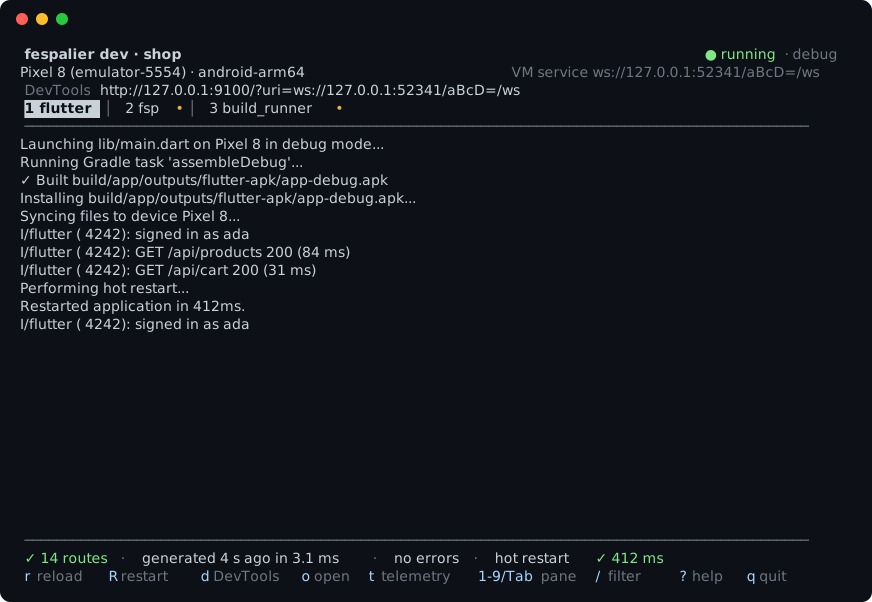
| Key | |
|---|---|
r / R | hot reload / hot restart |
d / o | open DevTools / open the app in the browser (web) |
t | start fsp telemetry |
Tab, 1–9 | switch between flutter, fsp and your own processes |
/ | filter the log; Esc clears |
? / q | help / quit |
- The header shows the device, the web address or VM service, and the DevTools link. The status line shows the route count, the first routing error (clickable in terminals that support links), and how long the last hot reload took.
- When flutter stops by itself (a build error, say), the view stays: fix it and press
R. --profile(since 0.24.0):fsp dev --profile stagingruns the app with the values ofconfig/app.staging.yamloverconfig/app.yaml, passing--dart-define=FSP_PROFILE=stagingto flutter. A save inconfig/that changes a value of that profile, or adds or removes a profile, hot restarts the app; since 0.24.1 one that changes only another profile's values hot reloads it (App configuration).fsp devrunsflutter run --machineand talks to it over flutter's own protocol, so it works the same on macOS, Linux and Windows. Flutter's other keys (p,w, ...) live in DevTools (d).- You can still run
fsp watchnext to your ownflutter run, or your editor's. - With several devices,
fsp devasks which one and remembers the answer in.dart_tool/fespalier/dev.json; with one phone or emulator it picks that. To name one yourself:fsp dev -- -d chrome.
A hot reload after a regeneration
Since 0.19.0. In a debug build of an app that uses the generated main() (an app.dart router() that returns AppRoutes.router() is fine), a hot reload after lib/app.g.dart was regenerated swaps in the new route table, and the app keeps its state, for the edits that swap (below). fsp dev does it by itself (below); next to flutter run or in your IDE, press r. A page you were on keeps its state (a count, a form's text), a removed route shows the not-found page, and a new page opens at its URL with AboutRoute().go(context).
What swaps, and when. The router takes the regenerated routes when the generated file changed, and nothing the table keeps changed (below). An edit to a page's own file does not change
app.g.dart, so a hot reload of it swaps nothing and costs nothing. A profile or release build never swaps: it keeps the routes it started with.Which edits swap. Since 0.20.0 the names the file gives what a hot reload keeps come from the folders, not from where a route sorts:
products/$id/data.dart's provider is_dataProductsId, the deferredcheckout/page.dart's library_libCheckout(importeddeferred as _pageCheckout, so the code it loaded stays loaded through a swap that adds a file before it, a route or not),edit()ofnotes/$id/action.dart_actionNotesId_edit. So adding, removing or renaming a page swaps wherever it goes, and so does adding or removing a route with its owndata.dartoraction.dart, a deferred route (since 0.20.0 also beside another:AppRoutes.deferredis a getter the swap lists again, so withdeferred: truein pubspec.yaml a page added or removed swaps, and so does one added below aroute.dartwithconst deferred = true; the first deferred route and the removal of the last also rewritelib/app.main.g.dart, sofsp devrestarts for those),deferredturned on or off in aroute.dart, or a new name for a page's class. Refused (next bullet): a changeddata()function (its keys,FutureorStream, afreshnessordataCachebeside it) or action (its input, keys,validate(),optimistic(),form(),invalidates, a multi-page form's steps); adata.dartadded or removed that an action invalidates (by default its own folder's and its sections'); a moved or renamed folder that has adata.dartor anaction.dart; a prefixed type (m.Itemas an action's input,m.Categoryas the enum segment of a data route) whoseimport ... as mis pointed at another library, even one with the same type name (the swap accepted that before 0.20.0); a router setting. In the shop example a newabout/page.dartswaps, as a newzz/page.dartdoes; a restart (R) brings in what a swap refuses. Two folders that both have names and whose paths give the same stem (order-history/andorder_history/,(shop)/cart/andshop/cart/) each get_and 8 hex digits of a hash of their folder (_dataOrderHistory_a6adc020), so adding the second renames the first one's names once, and removing one of the two renames the other back. When the names that change are only deferred libraries (two deferred pages:_libOrderHistorybecomes_libOrderHistory_a6adc020, and no name is in both files), the edit swaps, and a page of the renamed library on screen loads its code again through its loading view, so its state starts over. When one is adata.dart's provider or an action (a folder with adata.dartor anaction.dart, whose route class keeps the name), both edits are refused. A third folder with the same stem renames nothing. If the 8 digits agree as well (about one pair in four billion),fspstops with an error that names both folders. Before 0.20.0 the names were numbered by position (_data6,_lib2,_action3_0), and a route put before one with adata()function, an action or a deferred page was refused, and so was a second deferred route (AppRoutes.deferredwas astatic finallist).What is kept. The state of the pages on screen, of the layouts and their navigators, and of a page a
pushput on top of the root navigator. The tab on screen keeps its stack, and from go_router 18.1.1 so does every tab that was loaded.What
fsp devdoes. After a regeneration that writeslib/app.g.dart,fsp devreloads the app when it can swap the routes, and restarts it when it cannot. Itsfsplines say which:texthot reload: lib/app.g.dart changed hot restart: lib/app.g.dart changed hot restart: lib/app.g.dart changed and the hot reload failed hot restart: the app kept its old routes hot restart: lib/app.config.g.dart changedPlain output puts
[fsp]and a space in front of each. The fifth is the line of 0.24.0:config/changed, and the app restarts for its values. Since 0.24.1 it does so when a value of the profile the app runs changed or a profile was added or removed, and for any change whenfsp devcannot read the profile of the run. It follows a regeneration that wrote nothing too, when the file holds values the app was not built from (agit checkout, or a restart that failed), and it is said only when the restart is sent; a change to another profile's values printshot reload: lib/app.config.g.dart changedand reloads the app instead (App configuration). The second is the line of 0.9.0, unchanged. The third follows a reload of a regeneration that flutter refused (its✗ hot reload failedline comes first): one restart runs the file on disk. The fourth is the refusal above, answered with a restart, once for each version:fsp devhears it as an event of flutter's protocol (app.log) or, where flutter prints the app's output as plain lines (the web), as one of those, and acts on it only when a reload went out since the last restart, so the same line said again does not restart twice.fsp devreloads whenlib/app.main.g.dartwas not rewritten (a reload never runsmain()again), the app'srouter()is the generated one, and the new routes swap in from the ones the app holds:fsp devreads_versionand_keptback from the file on disk, and applies the rule the app applies, so that no name both keep has another hash. It restarts otherwise: when the main was rewritten, whenrouter()builds its own router, when the file has no stamp, when the app has not started yet (the restart waits forapp.start), when the app holds no routes to compare with (a save that finds arouter()of your own drops them, so after you change it to the generated one the first regeneration restarts once and sets them), when the routes do not swap in, when the last hot result failed, when a reload still in flight does not swap to the new routes either, and when a restart is under way. A save that does not regenerate the routes reloads, as before, unless the configuration it reads holds values the app does not have (the fifth line above).hot_reload: falseintasks: dev:turns the automatic ones off: a regeneration sends nothing, andrandRstill work.The swap relies on
lib/main.dartcallingAppMain.run()(which every scaffold and example does) orrunApp(AppMain.root()): both putStartupGatearound the router.fspreads the app folder, notlib/main.dart, so an app whosemain()builds the router's widget tree another way keeps its routes until a restart, andfsp devcannot tell.A refused swap. The table keeps some fields a hot reload does not re-run: each top-level and static
final(a provider, a deferred library, adata.dart's providers) and the router's settings (thefespalier:keys that shaperouter(), and the adapters). A name present both before and after with another value refuses the swap: the app keeps its old routes, and the debug console prints this once for that version:textfespalier: the regenerated routes change a provider, a deferred library or a router setting that a hot reload keeps, so the app keeps its old routes: hot restart (R) to use the new onesAdded or removed names do not refuse it. A hot restart (
R) brings in the new routes. If building the regenerated routes throws, the error is reported (while building the routes again after a hot reload), the old routes stay, and the next hot reload tries the same file again.The limits.
- The tab on screen keeps its stack. From go_router 18.1.1 every tab that was loaded keeps its stack too, and the pages of a tab that is not on screen run no
onLeavewhen a swap keeps them: go_router keeps a branch's state by its navigator key, which the generated routes reuse. A loaded tab the edit removed keeps its pages until its layout goes; theironLeaveruns then, and a tab on screen whose location the edit removes leaves the layout with it. Before go_router 18.1.1 a tab that is not on screen starts over at its first page, and theobserve.dartpages it held runonLeave: go_router kept the state of a branch by itsStatefulShellBranchobject, which the regenerated table makes again. fespalier allows both (>=17.2.3 <19.0.0), so the tab you left behind is either kept or reset, by the go_router the app resolved. - On go_router 17 (Flutter below 3.44), a page pushed inside a layout is lost by a swap. Pushed pages on the root navigator are kept on both.
- The swap is a navigation to where the user is: the guards, the
redirects and the adapters'onEnterrun again, as they do forrefresh(). - With
telemetry: true, a swap that keeps the location starts no navigation. A guard that moves the user is a navigation like any other. The DevTools history gets one entry for each commit, the swap's included. - An app with
main: manualdoes not swap, even when it buildsAppRoutes.router()in its ownmain(): the swap starts in thereassembleofStartupGate, which only the generatedmain()puts around the router. Nor does one that builds its ownGoRouteraroundAppRoutes.mount(at:). Both keep the routes they started with until a restart. - In DevTools, a guard's decision recorded before a swap that added or removed a folder ahead of it can name another guard's file after a refresh: guard and
redirect.dartsites are still numbered by folder (adata.dart's and an action's follow their folder since 0.20.0). - A deferred route a swap adds loads its code on its first visit, off the web too (the generated
main()loads the others before the first frame, once); a page on screen whose route turnsdeferredon moves into aDeferredView, and one whose route turns it off leaves it, so its state starts over either way. - A deferred route a swap removes stays registered (
DeferredLibrary.anyPending,DeferredLibrary.loadAll()without arguments) until a restart;AppRoutes.loadDeferred()loads the current ones.
- The tab on screen keeps its stack. From go_router 18.1.1 every tab that was loaded keeps its stack too, and the pages of a tab that is not on screen run no
UNCHECKED. The tests run the swap in Flutter's test binding, on go_router 17 and 18.
just dev-e2eruns, in headless Chrome, the reload of a new route and of one put before adata()route (each opened after the reload), a deferred page opened after a route was put before it, and a second deferred route reloaded in while the first is on screen (its code stays loaded), the restart after thatdata()became a stream, and the restart after an app refused a swap. A deviceflutter run(Android, iOS, the tab, a route put before a data route, a deferred route added or removed,deferredturned on or off, the refused swap, profile) is ahuman-testissue. Its steps add a page anywhere to see a swap, and change adata()or a router setting to see a refusal.
Tasks: commands around flutter run
Add what your app needs around flutter run under tasks: in the fespalier: section of pubspec.yaml:
fespalier:
  tasks:
    dev:
      before: dart run build_runner build # runs first; if it fails, fsp dev stops
      with:
        build_runner: dart run build_runner watch # runs alongside, in a pane of its own
      env:
        API_URL: http://localhost:8080
codegen: dart run build_runner build # fsp run codegen| Key | What it is |
|---|---|
run | The main command. dev defaults to flutter run (fsp adds --machine, the device and your args), build to flutter build. Write fvm flutter run, or a script that passes "$@" on to flutter run. |
before | A command or a list, run one after the other before run. The first that fails stops the task with its exit code. |
with | Long-running commands, by name, started next to run and stopped with it. |
after | A command or a list, run when run exits 0. |
env | Variables for these commands (not for the app: the app's values are in config/, see App configuration). |
hot_reload | dev only. false turns the automatic reload and restart off; r and R still work. |
build_runnerneeds no-dhere: since build_runner 2.7.0 it ignores the flag and deletes conflicting outputs on its own. That is also why it can deletelib/app.g.dart, inbefore, inwithand infsp run codegenalike, when alib/app.dartexists and a builder writes.g.dartfiles (json_serializable, riverpod_generator, ...): they claim anX.g.dartfor everyX.dart,fsp's file included, and nothing is logged. Since 0.17.0fsp devwarns about it (asfsp gendoes, see The generator); setoutput: lib/routes.g.dartin thefespalier:section, or renamelib/app.dart, before you add these tasks.- A command written as a string runs in the shell (
shon macOS and Linux,cmdon Windows). Written as a list ([flutter, test]) it runs with no shell, the same everywhere. fspat the start of a command is thefsprunning the task, even underdart run fespalier.- A list under
beforeorafteris a list of commands, sobefore: [dart, run, x]is three shell commands; writebefore: [[dart, run, x]]for one command with no shell. - A task that is only
runcan be written as the command itself, ascodegenis above. - A custom
rungets--machineand the arguments after--appended, but not a device: put-din it, or after--. - A mistake in
tasks:is reported byfsp dev,fsp buildandfsp run, never byfsp gen.
fsp build and fsp run
fsp build <target> runs fsp gen, then the build task: before, flutter build <target> (plus your args after --), after. fsp run <task> runs a task of your own; fsp run alone lists them, and fsp run --json lists them for the editor plugins (since 0.22.0, see Tasks in your editor). --dry-run prints what would run and runs nothing.
Since 0.24.0, fsp build <target> --profile <name> builds with the values of config/app.<name>.yaml over config/app.yaml, and its commands get FSP_PROFILE and FSP_CONFIG_* (App configuration). --profile release is refused: Flutter's build mode goes after --.
check: # fsp run check
  before: [fsp check, fsp test --check]
  run: [flutter, test]
web: # fsp run web
  run: fsp build web -- --release
  after: fsp size --check
fsp telemetry starts its stack and returns, so it goes in before (before: fsp telemetry), not with.
Tasks in your editor
Since 0.22.0 the VS Code and IntelliJ plugins run the tasks: of your pubspec.yaml, next to the diagnostics. Both read them from fsp run --json (see below).
VS Code. Terminal | Run Task... | fespalier lists
devand each task of your own, each in a terminal of its own, sofsp devshows its full-screen view. With several projects in one workspace folder a task is namedname - <path>, where<path>is its project's folder, relative to the workspace folder. The list is read again when apubspec.yamlchanges. A list that could not be read (nofsp, or one older than 0.22.0) is not kept: a warning says why, and the next Run Task asks again, sofsp upgradeis enough.buildneeds a target, so it is a.vscode/tasks.jsonentry with"type": "fespalier","task": "build"and a"target"(add"path"when the project is not the workspace folder itself):json{ "version": "2.0.0", "tasks": [ { "type": "fespalier", "task": "build", "target": "web", "args": ["--release"], "label": "build web", "problemMatcher": [] } ] }An entry is checked before it runs:
argsmust be a list of strings,pathandtargetstrings, and the folder (the workspace folder, orpathbelow it) must have apubspec.yaml; otherwise a message says what is wrong and nothing runs.UNCHECKED on a device. The Run Task list, the terminals and Terminate Task have not run in VS Code. The tests run the task provider against a stand-in for the
vscodemodule: they check the parsing offsp run --json, the commands, what is kept and warned about when a listing fails, the labels, and how atasks.jsonentry is checked and resolved.IntelliJ IDEA and Android Studio. A run icon sits beside each task key in
pubspec.yamlwhere the YAML plugin is installed, as it is in both; the keys must be a block mapping, sotasks: {codegen: ...}(a flow mapping) gets no icon, although Run Task... still lists its tasks. Tools | fespalier: Run Task... lists every task,devandbuildincluded. A task runs through a fespalier task run configuration, found by its project folder and task, or made when there is none: it is namedcodegen (shop), orcodegen (apps/shop)when the project is below the IDE project's folder, so two projects that share a folder name keep two. Run | Edit Configurations... | + | fespalier task makes one by hand: the project folder (it must have apubspec.yaml), the task, a target forbuild, and the arguments after--. The run console is not a terminal, sofsp devprints plain lines: typer,Rorqand Enter, and with several devices put-d <id>in the arguments. On Linux and macOS, Stop sends Ctrl-C first, sofsp devstops flutter; on Windows it ends the process at once unless the IDE's registry keykill.windows.processes.softlyis on, andfsp devthen cannot ask flutter to stop the app. UNCHECKED on a device. Stop, the run console and Windows have not run in an IDE; the tests run a headless IDE for the run icons, the run configurations a task finds or makes and the run configuration's command line only.
Both read the list from fsp run --json (no task name): one JSON object per task on stdout, dev and build first, then the order of tasks:. The codegen task of the example above is:
{
  "name": "codegen",
  "args": ["run", "codegen"],
  "needs_target": false,
  "run": "dart run build_runner build",
  "declared": true
}| Key | What it is |
|---|---|
name | The key in tasks:. dev and build are always listed, even when tasks: does not set them. |
args | What to give fsp: ["dev"], ["build"] or ["run", "<name>"], so an editor need not know that fsp run dev is refused. |
needs_target | true for build: the target goes right after args. |
run | The task's main command as fsp run lists it: its run, else flutter run for dev and flutter build for build, else empty. |
declared | Whether pubspec.yaml has the task. |
Keys are only added, never renamed.
fsp run --json exits 0 when it lists the tasks, also when there is no tasks:. A mistake in tasks: or in pubspec.yaml exits 1, with the message on stderr and nothing on stdout. --json cannot be combined with a task name, with --dry-run or with arguments after -- (exit 2). An fsp older than 0.22.0 has no --json and exits 2 with unexpected argument '--json' found; the plugins then say this fsp cannot list tasks: `fsp run --json` needs fespalier 0.22.0 or later. Both run the fsp they find, as Editor plugins says, so with dart run fespalier the app's own fespalier version decides.
Plain output, CI and Windows
Outside a terminal (CI, an IDE's run panel), with TERM=dumb, or with fsp dev --no-tui, fsp dev prints each line with the name of the process in front ([flutter], [fsp], [build_runner]). You type r, R or q followed by Enter. With several devices and no terminal to ask in, pass one: fsp dev -- -d <id>. Quitting asks flutter to stop the app, then stops the with commands and everything they started; a second q or Ctrl-C stops them at once.
Deep links and a sitemap (fsp links)
Since 0.5.0. fsp links writes the lists the platforms want from the route tree, so you don't keep them by hand: the <intent-filter>s of Android App Links and assetlinks.json, the apple-app-site-association file and the entitlement of iOS Universal Links, and a sitemap.xml. Say where the app lives in pubspec.yaml:
fespalier:
  links:
    domains: [shop.example.com] # required; the first one is the sitemap's
    scheme: myshop # optional custom scheme: myshop://shop.example.com/products/2
    scheme_host: true # since 0.11.0; `false`: myshop:///products/2, any host (see below)
    paths: [/, /products/*] # since 0.11.0; default: every linkable route (see below)
    android_package: com.example.shop # with android_sha256: the Android files
    android_sha256: ["AB:CD:...:EF"] # the signing certificates' fingerprints, 32 hex pairs each
    ios_app_id: ABCDE12345.com.example.shop # Team ID, a dot, the bundle id: the iOS files
    android_manifest: android/app/src/main/AndroidManifest.xml # since 0.11.0; opt in: `fsp links` edits it (see below)
    ios_entitlements: ios/Runner/Runner.entitlements # since 0.11.0; opt in: `fsp links` edits its applinks: entries
    # flavors: ...                    # since 0.11.0: instead of the keys for one app above (see Flavours)
    out: links # default: where the files go, relative to the project; `false` (since 0.12.0): no sitemap, no .well-known (see below)
It then writes below out (links/ unless you say otherwise; commit it, like app.g.dart):
links/
  android/intent-filters.xml                  one <intent-filter android:autoVerify="true"> per domain, one for `scheme`
  ios/associated-domains.entitlements         the applinks:<domain> entries
  ios/info-url-types.xml                      CFBundleURLTypes, with `scheme` and `ios_app_id`
  web/.well-known/assetlinks.json             serve it at https://<domain>/.well-known/assetlinks.json
  web/.well-known/apple-app-site-association  serve it at the same place, as application/json, without a redirect
web/sitemap.xml every static route, on the first domain- The Android files are written when
android_packageis set (it needsandroid_sha256, and the reverse), the iOS ones whenios_app_idis, and the sitemap always. out: false(since 0.12.0) writes nothing belowout: no sitemap, no.well-knownfiles, no copies of the snippets.fsp linksthen manages only the platform files you opted into (android_manifest,ios_entitlements), andfsp links --checkcompares only those, ignoring whatever is left in the old folder (fsp linksdoesn't remove it).trueis an error. Use it when the app serves its own/.well-knownfiles and sitemap. It needs something to manage: withoutandroid_manifestorios_entitlementsit is an error (leaves `fsp links` nothing to write). The rest of the config is checked as usual: the first domain still can't be a wildcard, andios_app_idstill takes a Team ID. A YAML 1.2out: nois the folderno/, notfalse.android_sha256is optional without: false(since 0.12.0): the fingerprints only go intoassetlinks.json, which isn't written then, soandroid_packagecan stand alone (the manifest's filters don't need them), andandroid_sha256withoutandroid_packageis still an error. Any you list are still checked. Whilefsp linkswritesassetlinks.json,android_packagewithoutandroid_sha256is the errorneeds `android_sha256` while `fsp links` writes assetlinks.json.- A missing key, or a fingerprint or package that isn't one, is an error that names the key. Only
fsp linkschecks them: a mistake there never stopsfsp gen. (Since 0.16.0fsp genalso readsdomains, forAppRoutes.urlOf, and warns when the first one is not usable; it never fails on it.) - A file the config no longer asks for is removed by
fsp linksand reported by--check.
What is listed. Each route's path, in each spelling of its localized paths, and every route in a folder that doesn't say const linkable = false; (a route.dart constant, inherited down the tree). Redirects are opened by the app, so they are in the Android and iOS lists; a sitemap leaves them out.
| Route | Android | iOS (components) | Sitemap |
|---|---|---|---|
/about (static) | android:path="/about" | /about | listed |
/products/:id | pathPattern="/products/..*" | /products/?* | left out |
/docs/*rest | pathPrefix="/docs/" | /docs/?* | left out |
/files/*path? | path="/files" and pathPrefix="/files/" | /files and /files/* | left out |
help/ with {'fr': 'aide'} | one entry per spelling | one entry per spelling | one <url> per spelling |
- A
$dynamicsegment is a wildcard. Android'spathPatterncan't say "one segment", so/products/..*also lets/products/2/extrathrough; the app's router has the last word and shows its not-found view. iOS's?*is the same.linkable = falseremoves a route's own entries; it can't carve a hole out of the wildcard a dynamic sibling makes (a$slugat the root lets every one-segment path in). - Localized spellings. Android gets the characters as written, which it compares with the decoded path (
/führer); iOS and the sitemap get the percent-encoded form (/f%C3%BChrer). The sitemap gives each spelling its own<url>withxhtml:linkhreflangalternates for every locale (the canonical path isx-default). - iOS case. A case-insensitive route gets
"caseSensitive": falsein its component (withpaths:, an entry such a route meets). Android always matches by case. - The sitemap lists static routes only. Dynamic routes and catch-alls have no URL to write down without data fespalier doesn't have. Guards aren't looked at: a route behind a guard is listed, so mark it
linkable = falseif a crawler shouldn't see it. - Mounting. The paths are the routes' own: an app that mounts its routes under a prefix (
AppRoutes.mount(at: '/shop')) has to put the prefix in front itself.
Using the files. Since 0.11.0 fsp links can edit AndroidManifest.xml and the .entitlements files itself, when you ask it to. It never edits Info.plist, and without those keys it edits nothing: copy the output in yourself.
- Paste
android/intent-filters.xmlinto the<activity>ofandroid/app/src/main/AndroidManifest.xmlthat has theMAIN/LAUNCHERfilter (replace what you pasted last time), or setandroid_manifest:. - Add the
applinks:lines ofios/associated-domains.entitlementstoios/Runner/Runner.entitlements, or setios_entitlements:. Add the entry ofios/info-url-types.xmltoInfo.plist. With flavours, do it in each flavour's own.entitlementsandInfo.plist. - Copy
links/web/into your Flutter project'sweb/folder (flutter build webships.well-known/as it ships the rest), or serve it from wherever the domain's server keeps its files.
Android only verifies a domain when assetlinks.json is served over HTTPS at /.well-known/assetlinks.json with no redirect.
Staying current. The output is a function of the tree and the pubspec (a fixed order, no dates). fsp links --check writes nothing and exits non-zero when a file is missing, out of date or no longer wanted, and names it; run it in CI next to fsp check (Links in CI).
Flavours
Since 0.11.0. An app built in flavours (prod and debug, each with its own application id, signing certificate and bundle id) lists them instead of the flat keys:
fespalier:
  links:
    domains: [shop.example.com]
    scheme: myshop
    android_manifest: android/app/src/main/AndroidManifest.xml # since 0.11.0, one for all flavours (see below)
    flavors:
      prod:
        android_package: com.example.shop
        android_sha256: ["AB:CD:...:EF"]
        ios_app_id: ABCDE12345.com.example.shop
        ios_entitlements: ios/Runner/RunnerProd.entitlements # since 0.11.0, see below
      debug:
        android_package: com.example.shop.debug
        android_sha256: ["12:34:...:56"]
        ios_app_id: ABCDE12345.com.example.shop.debug
ios_entitlements: ios/Runner/RunnerDebug.entitlements- Each flavour is an app. Name it as Gradle does (
prod,devStaging): letters, digits and_, starting with a lower-case letter. An emptyflavors:or a name listed twice is an error. It setsandroid_package(withandroid_sha256, unlessout: false),ios_app_id(with an optionalios_entitlements, the file of that flavour) or both. Two flavours can't share a package or an app id. assetlinks.jsonhas one statement per package, in the order the pubspec lists them. The association file has onedetailsentry whoseappIDsholds every app id, with the samecomponents.- The flat keys still work, as one app with no name (
android_package,android_sha256,ios_app_idandios_entitlements): a config with noflavors:writes exactly what it wrote before. Setting any of them besideflavors:is an error. - Domains and the scheme are shared. A flavour with its own
domains:is aninvalid pubspec.yamlerror. info-url-types.xmluses the bundle id of the first iOS app.
Host-less schemes and path patterns
Since 0.11.0.
scheme_host: false writes the scheme's intent filter with the scheme alone (<data android:scheme="myshop" />: no host and no path, since Android ignores path attributes without a host), and makes the default link: of fsp maestro myshop://, so a flow opens myshop:///orders/42. The default, true, is the myshop://shop.example.com/orders/42 of before. Prefer the host-less form: the router matches the path only, so myshop:///orders/42 is /orders/42 however the embedding hands the link over, while myshop://orders/42 would be read as host orders and reach /42. It needs scheme.
paths: lists what the platforms open instead of every linkable route (the sitemap still comes from the routes). Each entry starts with /: /about is that path, /orders/* is everything below /orders/ (not /orders itself), and * is only ever the whole last segment (/* is everything). An entry is literal: /orders/:id and /orders/$id are errors (write /orders/*), and so are an empty, . or .. segment and any of ?, #, %, \ and whitespace. A component is case-sensitive, except that an entry a case-insensitive route meets gets "caseSensitive": false; Android always matches by case.
| Entry | Android | iOS (components) |
|---|---|---|
/ | android:path="/" | / |
/about | android:path="/about" | /about |
/orders/* | pathPrefix="/orders/" | /orders/* |
fsp links warns, without failing (--check doesn't either), where paths: and the routes disagree: a linkable route no entry covers (add `/orders/*`, or `const linkable = false;` in its route.dart: the entry it suggests is the exact path for a static route, /orders/* below a dynamic segment, and both /files and /files/* for an optional catch-all), and an entry no linkable route matches. An empty list is an error: leave paths: out to list every route.
Maestro and paths:. fsp maestro writes a flow for every route, whatever paths: lists. With the default https:// or scheme://<domain> link, a flow for a route that paths: leaves out can't open on a device (a host-less scheme filter has no paths, so it can). Give those routes no flow with const linkable = false;, or ignore them.
Editing AndroidManifest.xml and the entitlements
Since 0.11.0. Two keys of links: make fsp links edit the platform files, so the filters and the associated domains are never pasted by hand. Both are opt-in: without them fsp links writes only the files below out.
fespalier:
  links:
    android_manifest: android/app/src/main/AndroidManifest.xml # needs android_package
    ios_entitlements: ios/Runner/Runner.entitlements # needs ios_app_id; per flavour with `flavors:`
android_manifest is a path to a file called AndroidManifest.xml under android/, and ios_entitlements a .entitlements file under ios/, both relative to the project. android_manifest is top-level only (a flavour's own is an unknown field): the filters are the same for every flavour, and a flavour's manifest in android/app/src/<flavour>/ is a case for markers by hand. Each flavour names its own ios_entitlements (two may name the same file). The domains are the same in every flavour, so each file gets the same entries.
The manifest. The intent filters go between two comment markers, in the one <activity> that has the MAIN intent filter:
            <!-- fsp links: begin. Written from lib/app by `fsp links`; change links: in pubspec.yaml, not these lines. -->
            <intent-filter android:autoVerify="true">
                ...
            </intent-filter>
            <!-- fsp links: end -->
</activity>- The first run has no markers to go by. It finds the activity with the
MAINaction (an<activity-alias>and anything in a comment don't count) and inserts the block before its</activity>, indented four spaces deeper than that line. The file must have exactly one such activity, and the file must exist:fspdoesn't create a manifest (flutter create --platforms android .does). - Later runs replace only what is between the markers, so a second run changes no byte, and nothing outside them is touched: your other filters, your comments, the file's line endings.
- Markers must be inside an
<activity>(or<activity-alias>), both in the same one: Android reads intent filters nowhere else, so markers in<application>or split between elements are an error. - By hand. A manifest with several launcher activities, or a flavour manifest of its own, gets the markers where you want them: write
<!-- fsp links: begin -->and<!-- fsp links: end -->on two lines of their own inside the activity that opens links, and runfsp links. Those marker lines stay as you wrote them. - A filter of your own for one of the
domains(or for thescheme, withscheme_host: false) outside the markers is a warning, with its line: remove it,fsp linkswrites that filter now.
An entitlements file. fsp links owns every <string>applinks:...</string> entry of the com.apple.developer.associated-domains array, one per domain, and nothing else in the file. An applinks: entry you added by hand (a staging domain, applinks:x.example.com?mode=developer) is removed on the next run, with a warning that names it: put the domain in domains: instead.
- With the key there, only the
applinks:items are removed and rewritten: the other entries (webcredentials:,activitycontinuation:), comments and their indentation stay byte for byte, and the newapplinks:items go before the end of the array, in domain order. An array that already holds exactly them is not touched. An empty<array/>is filled. A key whose value isn't an<array>is an error: fix it by hand. - Without the key, the entry goes in before the end of the top-level
<dict>. - A file that doesn't exist is written whole (a property list with that one entry), but only when its folder does: with no
ios/Runner/, it is an error that points atflutter create --platforms ios ., sofsp linksnever makes an iOS tree by itself. A file that isn't a property list with a<dict>at the top is an error. - The rest of the file is left as it is: toggling the Associated Domains capability rewrites the file, and the next run splices into what Xcode wrote.
- A file that no
CODE_SIGN_ENTITLEMENTS(spelled plainly, or with$(SRCROOT)/,${SRCROOT}/,$(PROJECT_DIR)/,$(SOURCE_ROOT)/or./in front) inios/Runner.xcodeproj/project.pbxprojnames is a warning: no build uses it. Add the Associated Domains capability in Xcode, or point the build setting (per flavour configuration) at the file.
A file that isn't UTF-8 is an error ({path} is not UTF-8; fsp links edits only UTF-8 files): the edit writes the whole file back, and a lossy rewrite would change bytes outside the markers. Files are written through a temporary file and a rename, so an interrupted run never leaves one empty. The copies below out say, when a platform file is managed, that fsp links does the pasting. A filter with tools:node="remove" or "removeAll" is not warned about.
Info.plist stays by hand, for the CFBundleURLTypes entry of ios/info-url-types.xml.
Flutter's deep linking switch (since 0.12.0). fsp links and fsp links --check read, and never edit, two settings that stop Flutter from handing links to the router: <meta-data android:name="flutter_deeplinking_enabled" android:value="false" /> (any value but true, inside the <activity>) in AndroidManifest.xml (the file android_manifest: names, else android/app/src/main/AndroidManifest.xml when an Android app is configured), and FlutterDeepLinkingEnabled set to <false/> (or <string>NO</string>, <integer>0</integer>) in ios/Runner/Info.plist (when an iOS app is configured). Each is a warning that doesn't fail --check: flutter_deeplinking_enabled is false in {manifest}: Flutter will not hand links to the router (intended with a deep-link plugin: ...), and the same for FlutterDeepLinkingEnabled is false in ios/Runner/Info.plist. A deep-link plugin asks for the switch off on purpose; see With a deep-link plugin. Flutter has had deep linking on by default since 3.27, so an app that never set the key is quiet.
--check. fsp links --check works out each platform file's edited text, compares it with the disk, writes nothing, and exits non-zero when one is stale. It says {path} has no fsp links markers yet for a manifest the first run hasn't reached, {path}: the intent filters between the fsp links markers are out of date, {path}: the applinks: entries of com.apple.developer.associated-domains are out of date or {path} is missing. A missing manifest is an error rather than a stale file, and the warnings don't fail it. When all is current it prints ✓ links: 5 files in links are up to date, and 2 platform files.
Links in CI
Since 0.11.0. Run fsp links --check next to fsp check, so a new route or a changed domain can't ship with a manifest, an entitlement or an association file that still says the old thing:
- run: dart run fespalier check && dart run fespalier links --checkWith the platform files opted in, the same step also fails when someone changed a route and forgot to run fsp links, or hand-edited the lines between the markers. The fix is the one command locally: dart run fespalier links, and commit the result. Warnings (a filter outside the markers, an entitlements file no build uses, a paths: entry no route matches) print but don't fail the step.
URLs to share: AppRoutes.urlOf
Since 0.16.0. The domain you gave links: is also where the app's routes live on the web, so fsp gen writes one more method into AppRoutes when links: has a usable first domain: the https URL of a typed route. It is what a share sheet, a notification payload or an og:url gives out, built from the route, so a renamed folder or a changed parameter cannot leave a stale string behind.
AppRoutes.urlOf(const ProductRoute(id: 2)); // https://shop.example.com/products/2
AppRoutes.urlOf(const HelpTopicRoute(topic: 'routing'), locale: 'fr'); // https://shop.example.com/aide/routingstatic Uri urlOf(TypedLocation route, {String? locale}) =>
Uri.parse('https://shop.example.com${route.locationFor(locale)}');- The host is the first of
domains:, in lower case: the one the sitemap is on. It is plainhttps; the customschemeis not used, because a custom-scheme link opens the app only where it is installed, and a link to share must open anywhere. localepicks the spelling of the localized segments, asroute.go(context, locale:)does:fr-CAfalls back tofr, and a locale the route has no spelling for gives the canonical path.- The mount prefix is in it, as in
route.location: withAppRoutes.mount(at: '/shop')the URL ishttps://shop.example.com/shop/products/2. The sitemap and the platform files list the routes' own paths, so this is the one place the prefix shows up; keep the domain's server in step with it. - Without
links:, there is nourlOf, and the generated file is what it was. - A
links:whose domainsfsp linkswould refuse (none, an entry that is not a host name, a wildcard first) gives nourlOfand a warning onpubspec.yaml,! pubspec.yaml `AppRoutes.urlOf` is not generated: `fespalier.links.domains` is required: ..., andfsp gengoes on. Fix the key (the same message is the errorfsp linksstops with). Onlydomainsis read byfsp gen: the rest of the section, a badandroid_sha256included, is still checked byfsp linksalone. - It builds a URL, it does not check one. Whether the domain's server answers there, and whether the platforms open it in the app, is what the files above are for.
Checking string paths
Since 0.7.0. A typed route can't be misspelled, but a string path is sometimes the right thing (a CMS link, a notification payload), and context.go('/prodcts/2') compiles, runs and shows not_found.dart. So fsp gen, check and watch read the string paths your code gives the router and warn about one that matches no route. A path that matches is fine: typed routes are preferred, not forced. (Why fsp and not an analyzer plugin.)
warning: no route matches `/prodcts/2`, so it shows not-found; did you mean `/products/2`? [unknown_path]
  ┌─ lib/screens/home.dart:2:14
  │
2 │   context.go('/prodcts/2');
  │              ^^^^^^^^^^^^
What is checked. A string literal in one of these places: the first argument of .go(...), .push(...), .pushReplacement(...) or .replace(...) on anything (context.go('/x'), GoRouter.of(context).push<int>('/x'), router..go('/x')); RouteLink(uri: Uri.parse('/x')); and initialLocation: of AppRoutes.router(...) or GoRouter(...). Not these: a bare go('/x') with no receiver, goNamed and pushNamed, Navigator.pushNamed, the typed routes, TabOptions(initialLocation:) (the generator already checks it against the tab), and AppRoutes.match, matchUrl, dataAt and preload, which exist to ask about any location. A path that is built ('/a' + b) or held in a variable is not a literal and is not read.
What matches. The same rules as AppRoutes.match: segments and catch-alls ($$rest needs one part, $$$rest none); case by the route's own setting; every localized spelling, mixed ones too; non-ASCII paths and % escapes decoded, a trailing slash or // ignored; a redirect.dart is a route, a not_found.dart is not; the query and the fragment are not looked at; and the first route that fits the path decides.
Since 0.8.1 segment types are checked too, the way the route parses them. /products/abc reaches products/$id, and with {required int id} that route shows not-found, so it is reported (`/products/abc` reaches /products/:id, but `abc` is not an int, so it shows not-found [unknown_path]). An app with unknown_path: error that passed on 0.7.0 can fail on 0.8.1 for a path that always showed not-found.
int,double,num,bool,DateTime(its start only) and enum segments are checked, and each part of a typed catch-all. An enum's message lists its values and suggests the nearest.- A part with a space or other non-ASCII whitespace is not judged (Dart trims it before parsing).
- The message names the route by its canonical pattern, also for a localized spelling.
Interpolation. A path that interpolates is checked up to its first $: '/products/$id' is fine and '/prodcts/$id' is flagged (no route starts with ...). The complete segments before the $ are checked by type too ('/products/abc/$tab' is reported), but nothing after a $ is, since the value can be empty or hold a /.
Skipped. A path that is not an app path: a relative one ('details'), a URL ('https://...'), one that starts with an interpolation ('$base/x'), one with a .. or a malformed % escape.
Which files. Every Dart file under lib/ (the app folder included), except the generated ones (*.g.dart, the output and output_manifest) and folders that start with a .. Not test/, integration_test/ or bin/: tests navigate to paths that match nothing on purpose, to try not_found.dart, and mount the tree under prefixes the app doesn't use.
The mount point. AppRoutes.mount(at: '/shop') is read, and a path is checked below it: /shop/products/2 is looked up as /products/2. A path outside the mount point belongs to the host router (legacyRoutes beside ...AppRoutes.mount(at: '/shop')) and is skipped. When at: is not a string literal, or two calls give two different values, the check reports nothing for the run. A host router with routes of its own and the tree mounted at / gets a warning for those routes' string paths: silence them as below, or turn the lint off.
Severity. lints: in the fespalier: section of pubspec.yaml:
fespalier:
  lints:
    unknown_path: warning # default; `error` fails `fsp gen` and `fsp check`; `off` skips the check
A warning never fails a command, so a false positive can't break a build. With error:
fsp checkexits 1 (1 error(s) in string paths (`lints: unknown_path: error`)).- So do
fsp genandfsp watch, after they write the output (...; lib/app.g.dart is up to date): a typo in some other file does not stopwatchfrom regenerating. fsp newandfsp initreport it as a warning at most.- If the route tree itself has errors, the check doesn't run: a half-resolved tree would make every path look unknown.
Silencing one. A comment on the line above, or after the path on its own line:
TextButton(
  // fsp:ignore unknown_path -- gift cards aren't built yet: not_found.dart shows
  onPressed: () => context.go('/gift-cards'),
  child: const Text('Gift cards'),
),
A comment on a line of its own covers the call that starts on the next line, however long it is; one after code covers that line. // fsp:ignore-file unknown_path anywhere in a file silences the file. The lint's id, unknown_path, is what both and lints: name; it is also the last word of the message. Both editor plugins show it in the file it is about, and check again when any Dart file under lib/ is saved.
Web chunk sizes (fsp size)
Since 0.8.1. A deferred route is a main.dart.js_N.part.js on the web, and the chunk files say nothing about which route they belong to. fsp size reads that out of the build, reports what each deferred route costs, and can hold the build to byte budgets in CI. Build for the web first (flutter build web), then:
fsp size                # report main.dart.js and each deferred route's chunks
fsp size --json         # the same, one JSON object per line
fsp size --check        # CI: non-zero exit when a budget in `size:` is exceeded
fsp size --build out    # a build in another folder (default: `build/web`, or `size.build`)
For examples/shop, which defers /checkout and /products/:id (a release build, Flutter 3.47.5):
main.dart.js                                          2384299 B (2.3 MB)  budget 3.0 MB
/checkout      CheckoutRoute  checkout/page.dart      5259 B (5.1 KB)     own 1090 B, shared 4169 B  budget 8.0 KB
/products/:id  ProductRoute   products/$id/page.dart  5982 B (5.8 KB)     own 1813 B, shared 4169 B  budget 8.0 KB
shared main.dart.js_2.part.js 4169 B (4.1 KB): /checkout, /products/:id✓ size: 6 routes, 2 deferred, 3 parts, within budget(The summary goes to stderr, the report to stdout, so fsp size > report.txt keeps the report.)
- Own is the bytes of the chunks only this route loads, shared the bytes of the chunks it loads that other deferred routes load too, and the total is both: what a first visit downloads when nothing else is loaded. dart2js moves code that several deferred pages use into a shared chunk, so one chunk can count for several routes.
- Routes that are not deferred have no line: their code is in
main.dart.js, which the first line reports. The summary counts them (6 routes, 2 deferred). - A chunk that no route loads is listed as
other, with the deferred imports that do load it (code of your own that usesdeferred as). --jsonprints one object per line on stdout:{"kind":"main","file":"main.dart.js","bytes":…,"budget":…}; then{"kind":"route","pattern","route","file","parts":[…],"own","shared","bytes","budget"}for each deferred route (fileis the page, relative to the project;partsare in dart2js's order); then{"kind":"part","file","bytes","routes":[…]}for every chunk (routesis empty for anotherone).budgetisnullwithout one.
How it knows. dart2js writes a table of deferred parts into main.dart.js, in every build mode:
deferredLibraryParts:{_pageCheckout:[0,1],_pageProductsId:[0,2]},deferredPartUris:["main.dart.js_2.part.js","main.dart.js_1.part.js","main.dart.js_3.part.js"],The keys are the import prefixes of the generated app.g.dart (import 'app/checkout/page.dart' deferred as _pageCheckout;: since 0.20.0 a deferred page's prefix is _page and its folder's stem, _i7 before), and each value lists indexes into deferredPartUris (not the file numbering: index 0 is _2). fsp size knows each deferred route's prefix from the same tree that wrote the file, and adds up the sizes of the part files on disk. It needs no flag and no special build: it reads the build you deploy.
A budget goes in the fespalier: section of pubspec.yaml:
fespalier:
  size:
    build: build/web # default; the `flutter build web` output, inside the project
    main: 3 MB # main.dart.js
    route: 64 KB # each deferred route's total (own + shared)
    routes: # per route, by pattern as `fsp routes` prints it; wins over `route`
/checkout: 8 KB- A size is a number of bytes (an integer of at least 1), or a number with a unit:
B,KB(1,024 bytes) orMB(1,048,576 bytes), in capitals, with or without a space, with a fraction if you like:3 MB,1.5 MB,64KB,900 B. - A budget on a route that is not deferred is an error (budget that code with
main). fsp size --checkreports as above and exits non-zero when anything is over (2 over budget: /checkout, /products/:id), and also when there is no budget to check.
In CI:
- run: flutter build web --release
- run: fsp size --check
dart2js's output is deterministic for one Flutter version and one version of your code, so a budget is a ceiling that holds. A Flutter upgrade moves main.dart.js by kilobytes: keep about 30 % headroom on main and raise the budgets deliberately, in the commit that bumps Flutter.
A stale build is caught. The table is keyed by the routes as they were when you built, so a build older than your routes would be reported against the wrong ones. fsp size fails when the keys of the table are not exactly the prefixes the routes defer now (a deferred route added, removed or moved), and it warns when lib/app.g.dart is newer than main.dart.js:
warning: build/web/main.dart.js is older than lib/app.g.dart; if the routes changed since, run `flutter build web` againA build from an app.g.dart older than 0.20.0 (keys _i7, _i14) is one: build again.
Every message fsp size can print is quoted in the fespalier-troubleshooting skill.
Limits.
- Sizes are bytes on disk, not compressed: a server's gzip or brotli makes each chunk several times smaller, in about the same proportion for all of them. Use the numbers to compare chunks and to notice growth, not as a download size.
- It reads the JavaScript build. A
--wasmbuild also writes amain.dart.js(the fallback), which is what is read; the.wasmfile is not looked at. - The routes' own import prefixes are the only ones it matches, which is exact for an app whose deferred imports are the generated ones. A deferred import of your own named like the generated ones (
_pageand a capital, or_iand digits) counts as one of them. - For what is in a chunk,
flutter build web --dump-infowritesmain.dart.js.info.json(tens of megabytes) that a tool likedart pub global run dart2js_inforeads;fsp sizedoes not use it.
fsp upgrade
fsp upgrade (since 0.15.0) upgrades the fsp binary that runs it, by the installer that put it there. It needs no project, and it is the one command that looks at the network: it follows GitHub's releases/latest redirect with the system curl (-fsSL --proto =https, so HTTPS_PROXY and the OS trust store apply; without curl it stops and names the install script). With --app (since 0.23.0) it upgrades the app instead: see Moving the app's pins.
| Flag | What it does |
|---|---|
--check | Writes nothing. Prints the installed and the latest version and the command that would upgrade. Exit 0 when up to date (or ahead of the latest release), 3 when an update is available, 1 on an error (no network, no release). |
--dry-run | Prints what it would run or replace and does nothing. |
--json | With --check or --dry-run, one object on stdout: current, latest, target, method (homebrew, scoop, cargo, script, dart-run, source), command (null when the install cannot be upgraded from here) and upToDate. With --app (since 0.23.0) it is one object in every run: see below. |
--version <tag> | Upgrade (or downgrade) to vX.Y.Z or X.Y.Z instead of the latest, for an install-script install (a downgrade prints a notice); a Homebrew or Scoop install is pointed at the script's FSP_VERSION instead. |
--app | Moves the app's pins instead of upgrading fsp (since 0.23.0), to this fsp's release or to --version: see below. |
--no-pub-get | With --app: writes pubspec.yaml, and leaves flutter pub get to you. |
How the install is told apart, in this order: the dart run fespalier cache (<cache>/fespalier/<version>-<target>/), a build of the source tree (target/debug or target/release), Homebrew (Cellar/fsp/), Scoop (scoop/apps/fsp/, or under $SCOOP), cargo ($CARGO_HOME/bin, default ~/.cargo/bin), and otherwise the install script. Homebrew's upgrade runs with your terminal; Scoop's and cargo's commands are printed, not run; an install-script binary is replaced in place once the archive matches both the release's .sha256 and the checksum pinned at the tag (a mismatch, or a release without pins, is refused and nothing changes; see Upgrading fsp). The cache copy and a source build are refused, with the reason: the first follows the ref: in pubspec.yaml. FSP_RELEASES_URL and FSP_BASE_URL redirect the lookup and the downloads (see Upgrading fsp).
After an upgrade that installed a new fsp (Homebrew's or an install-script replace; not --check, --dry-run or the printed Scoop and cargo commands), fsp upgrade reads the pubspec.yaml it finds above the current folder, if any. When that pins fespalier from a repository at a ref: that is a release other than the fsp now installed, it adds a note: move the refs of fespalier and every companion to the fsp's release with fsp upgrade --app, or run dart run fespalier to use the fsp that matches the pin; for a pin newer than the fsp, the note says to upgrade fsp instead (moving the refs back would be a downgrade). A path or hosted dependency, a branch or commit ref:, or no project at all gives no note, and the exit code does not change.
Moving the app's pins
Since 0.23.0. fsp upgrade --app moves fespalier and its companion packages together: every ref: of a package of this repository in pubspec.yaml, under dependencies: and dev_dependencies: and as a git override of the same repository under dependency_overrides:, goes to one release. Since 0.23.1 so does a git override of the same repository in pubspec_overrides.yaml, whose dependency_overrides: pub reads in place of the pubspec's; when that file alone has a ref to move, the lines name it, not pubspec.yaml, and since 0.24.1, when both have one, the lines name both (pubspec.yaml and pubspec_overrides.yaml now pin vX.Y.Z), and so does the line that says every ref is at the release when both hold some.
fsp upgrade --app                     # every ref to the release of this fsp
fsp upgrade --app --version vX.Y.Z    # to another release
fsp upgrade --app --check             # exit 3 when a ref would move (for CI)
fsp upgrade --app --dry-run # what would move, and the notes- The release is the one of the
fspthat runs, unless--versionnames another:fspwrites the code of its own release, so the packages move to it. Withdart run fespalier, whosefspis the one of the release the app pins, give--version(fsp upgrade --checkprints the latest); that needs an app that pins 0.23.0 or later, since an olderfsphas no--app, so the first move from an older pin is a globalfspof 0.23.0 or later, or a hand edit. - It does not move the app back. When a ref is at a release newer than this
fspand there is no--version, it refuses (exit 1, writing nothing, also with--checkand--dry-run), names that pin and its file (since 0.24.1:pubspec_overrides.yaml pins fespalier_auth vX.Y.Z and fsp ...), and says to upgradefsp(fsp upgrade) or to use thefspof the pin (dart run fespalier).--version vX.Y.Zgoes back on purpose: the moves are marked(a downgrade), and the notes are a link only. - Only the
ref:values change: theurl, the comments, the quotes and the rest of the file stay as they are. Refs at different releases are fine, since moving them together is the point. Since 0.24.1pubspec_overrides.yamlandpubspec.yamlare written together: the first is written first, and gets its text back when the pubspec cannot be written, so a failed write moves nothing. Each is written through a temporary file renamed over it, so a write that fails part-way never leaves one cut; the file keeps its permissions and a symbolic link is written through. - It refuses, and writes nothing, when a package of this repository comes from another repository (or, since 0.24.1, from fespalier's repository spelled another way, such as over https next to an ssh
fespalier: pub takes two spellings for two sources), comes from a folder whilefespaliercomes from git, or is pinned to aref:that is not a release tag (a branch or a commit). The message lists each one. An override of this repository at a commit or a branch (a hotfix) is not refused: since 0.23.1 it is left as it is, with anote. - A fork or a mirror (a
fespalierwhoseurlis nothttps://github.com/fespalier/fespalier; that repository overhttpor ssh, with.git, a final/, another case or, since 0.24.1, a port or a user name, is not one) moves to this repository's tag names, which it must have too, and the notes link to this repository: since 0.23.1 anotesays so. - A checkout has nothing to move. An app that takes
fespalierfrom a folder (path:) gets a line that says so, and exit 0. An override to a folder, underdependency_overrides:or inpubspec_overrides.yaml, is left as it is, with anote. - The pubspec's own overrides while
pubspec_overrides.yamlhas the key are not read by pub, but are what it reads where that file is not (one kept out of git): they move or are kept all the same, and since 0.24.1 anotesays that pub does not read them here. - A member of a pub workspace (
resolution: workspace, in itspubspec.yamlor, since 0.24.1, in itspubspec_overrides.yaml, where pub reads it first) is resolved with the overrides of the workspace's root, which pub reads for every member (from the root'spubspec_overrides.yamlwhen that has the key, else from itspubspec.yaml). Since 0.24.1 an override there of this repository at another release is anotethat names the root's file, as you open it from the folder you ranfspin, and the line, with the change to make by hand:fsp upgrade --appdoes not write the root's file, which is every member's, since pub resolves the workspace once and its members move together. One at a release newer than thisfsp's (with no--version) is said to be newer instead, and not told to move back: upgradefsp, or use thefspof that release, as for the app's own pins. Any other override of a package of this repository there is anotethat it is left as it is. pub applies the overrides of every member to the whole workspace, not only the root's, andfspreads only the root's (and the app's own): the overrides of the other members are not read. - The migration notes come as soon as
pubspec.yamlis written, before any command that can fail. For each release after the oldest one the app pinned, up to the new one, it prints the first paragraph of its section in Upgrading (what breaks, and which apps regenerateapp.g.dart), the lead of each bullet, and a link to the section at the new release's tag. The notes are the ones the runningfspwas built with; for releases after it, it prints a link to the page at the new tag instead. A downgrade prints that link only. - Then it runs
flutter pub get(with--no-pub-getit leaves it to you and says thatpubspec.lockstill names the old commits) and, when the release is thefsp's own,fsp gen; for another release it says to regenerate with that release'sfsp. Ifpub getorgenfails, the refs stay moved, the notes are above the message, and the message says what to run (flutter pub get, thenfsp gen) or to put the old refs back; a secondfsp upgrade --appfinds every ref at the release and prints no notes. An interrupt (Ctrl-C) keeps the exit code 130.
--check prints the moves and writes nothing: exit 0 when every ref is at the release, 3 when one would move, 1 on an error (an fsp older than the app's pins is one). --dry-run prints the moves and the notes. --json prints one object on stdout, and the lines for people on stderr: from (the oldest release pinned, or the newest when every ref goes back), target, upToDate, packages (each with name, section, file (pubspec.yaml, or pubspec_overrides.yaml since 0.23.1), from, to and downgrade) and notes (the releases whose sections apply); for a checkout, checkout is the folder and packages is empty.
fsp doctor
fsp doctor (since 0.23.0) reports what the generated main() wires and why, and what is out of line around it: the fespalier refs of the app against the fsp you run, pubspec.lock, go_router and Flutter. Run it after you move the refs of an upgrade (what 0.23.0 asks), when an adapter does nothing, or in CI. It writes nothing, and it exits 1 only when a row is an error.
The report has three sections, each a list of rows under its title. Each row is one check, with a status and a message that stands alone. This is a fragment of the text output (the header, the other sections and the other rows are left out):
Versions
  ✓ fespalier    fespalier: git, ref v0.23.0, the version of this fsp
  ! lock         pubspec.lock resolves fespalier 0.22.1, and this fsp writes code for 0.23.0: move the refs to v0.23.0 with `fsp upgrade --app`, or run `dart run fespalier` to use the fsp of the pin
  ! lock         pubspec.lock resolves fespalier_push 0.22.0, and fespalier 0.22.1: give every companion fespalier's ref, then run `flutter pub get`
  ✓ go_router    go_router 18.1.0 (pubspec.lock), in what fespalier supports, >=17.2.3 <19.0.0

2 warnings.
The marks and statuses are these:
| Mark | Status | Meaning |
|---|---|---|
| ✓ | ok | as it should be |
| · | info | what is, neither right nor wrong (telemetry: false) |
| ! | warning | works, and may not be what you meant |
| ✗ | error | will not work as it is |
| - | skipped | not checked, and why (no pubspec.lock, no flutter on PATH) |
The sections and their check ids, one line each. The ids are part of the --json output, and new ones are only added.
- What the generated main() wires, and why (
wiring):main(whetherlib/app.main.g.dartis written, and why, or why it is not; skipped when the app folder cannot be read as a tree),root_file(per root file, what it gives the generatedmain()),hot_reload(whether a hot reload infsp devswaps the route table),adapter(per adapter that is on: whether a Dart file underlib/calls itsconfigure(; and per first-party adapter package underdependencies:that is off:infowhen nothing calls itsconfigure(, since a package of the family is often a dependency for something else, and a warning when a Dart file does andadapters:leaves the package out, because the adapter then never runs),telemetry,otel,forms(an error when an action has aform()andfespalier_formsis not a dependency),deferred(how many pages load on demand) andtasks(whethertasks:reads). - Versions (
versions):fespalier(itsref:against thisfsp; a branch, a commit or a path isinfo; no ref and a hosted constraint are a warning, and so is, since 0.23.1, fespalier underdev_dependencies:only, since the generated files underlib/import it; and, since 0.23.1, a git dependency on fespalier's own repository (https://github.com/fespalier/fespalier) withoutpath: packages/fespalier, or with another folder, is a warning of its own, since pub would read something else than the package; a mirror, a fork or a vendored copy lays its packages out as its owner made them, so itspath:is not compared, and./packages/fespalieror a final/ispackages/fespalier, as pub reads it),companion(per package of fespalier's repository: the sameurlandrefas fespalier, and, since 0.23.1, a warning of its own when a git dependency onhttps://github.com/fespalier/fespalierdoes not namepath: packages/<name>; since 0.23.1 a package is one of them when thisfspknows it, or when it is afespalier_git dependency onpackages/<name>of fespalier'surl(since 0.24.1 that repository however its url is spelled, so an https one next to an sshfespalieris one, with theurlwarning), as a package newer than thisfspis, and never by afespalier_name alone or by its place alone, sofespalier_extras: ^1.0.0from pub.dev and a fork's ownacme_uiinpackages/acme_uiget no row),override(per entry ofdependency_overrides:that is such a package,info; since 0.24.1 the entries pub reads, each naming its file: those ofpubspec_overrides.yamlwhen that file has thedependency_overrides:key, even with no value, in place of every one of the pubspec's, which then get aninforow each that says pub does not read them, and a path to a checkout'spackages/<name>of afespalier_package is one, so a package newer than thisfspkeeps its row; acompanionrow whose package an override takes the place of ends with the file of that override, and so does itslockwarning; thefespalierrow and itslockwarning say the same of an override of fespalier's own, since 0.24.1, and apubspec_overrides.yamlthat pub refuses is anoverrideerror that says pub stops on it, so nothing resolves until the file is fixed or removed: it is not valid YAML, not a YAML mapping, has a key other thandependency_overrides,resolutionandworkspace, aresolution:that is notworkspace,localorexternal, adependency_overrides:that is not a map or aworkspace:that is not a list of strings, each checked withdart pub geton Dart 3.13.5 and on the floor's 3.9.2),lock(whatpubspec.lockresolved: fespalier against thisfsp, and each companion against the fespalier it locked; skipped without the lock, which for a pub workspace member (resolution: workspace, in itspubspec.yamlor, since 0.24.1, in itspubspec_overrides.yaml) is the one at the workspace root, where pub writes it),go_router(the locked version against>=17.2.3 <19.0.0),flutteranddart(against Flutter 3.35.0 and Dart 3.9.0, a pre-release of the floor counting as below it, and a Flutter that reports0.0.0because its checkout has no tags is an error that says so; andflutterfor each dependency that needs a newer Flutter:fespalier_download_background3.47.0,fespalier_keypair,fespalier_keypair_dpopandfespalier_sign_keypair3.44.0). - Checks (
checks):config(apubspec.yamlthatfsprefuses: one error row, and the wiring rows and the other checks are left out, but the versions still show),section(perlinks:,maestro:,size:andtest:, checked as their own command checks them),build_runner(the warningfsp checkprints for a generated file thatbuild_runnerwould delete, or an ok row),main_dart(whetherlib/main.dart, or another Dart file underlib/that it hands over to (abootstrap.dart), callsAppMain.run(), and withmain: manualand adapters, whether a Dart file callsAppAdapters), andfsp_check(one line: how many routes, and how many errors and warningsfsp checkfinds that no row above is already).
Exit codes. 0 when no row is an error (warnings and skipped rows included). 1 when one is, and the report is the whole of the output. 2 for a usage error, from the argument parser.
--json prints one object per row, one per line, on stdout, with every key always there and in this order: section (wiring, versions or checks), check, subject (the package or file the row is about, or null), status (ok, info, warning, error or skipped) and message:
{"section":"wiring","check":"main","subject":null,"status":"ok","message":"lib/app.main.g.dart is written: lib/app/app.dart exists"}What it reads. The project's pubspec.yaml, its pubspec_overrides.yaml (since 0.24.1) and pubspec.lock (for a pub workspace member, the root's: a member has none of its own); every Dart file under lib/ but the ones fsp writes (*.g.dart, output: and output_manifest:), by their text, for AppMain.run(, AppAdapters. and the adapters' configure( calls; whatever fsp check reads (the files of the path: dependencies, with their pubspecs, pubspec_overrides.yaml and the workspace root's pubspec and pubspec_overrides.yaml, and the pubspecs of the folders between the app and that root, with, since 0.24.1, their pubspec_overrides.yaml too, for resolution: and workspace:); and flutter --version --machine, with the flutter on PATH. With FVM or puro, run it through the SDK the project uses (for example fvm exec fsp doctor), so that the Flutter it checks is the project's. fsp itself never reads the pub cache or .dart_tool/, never reaches the network and writes nothing. The flutter it runs is another program: it may reach the network (its analytics, or the download of its Dart SDK on a fresh clone) and write its own cache. It never fails because flutter is missing: that row is skipped. It does not wait for a flutter that does not answer either (since 0.23.1): one that has not answered in 30 seconds (a first run that is still downloading its Dart SDK, or one that waits for another flutter command's startup lock, which the row names only when flutter said so) is stopped with what it started, and the row is skipped and says so; run flutter --version once to let a first run finish. flutter runs in a process group of its own, so Ctrl-C does not reach it: fsp doctor stops it itself on Ctrl-C or SIGTERM, prints no report and exits with 130.
What it does not repeat. fsp doctor repeats no fsp check diagnostic, but counts them: the fsp_check row says how many errors and warnings fsp check finds, and fsp check says where. Two kinds of diagnostic have a row of their own, and fsp check prints them too: the forms error (an action with a form() and no fespalier_forms) and the build_runner warning. The fsp_check row leaves them out of its count and says "besides what the rows above report", so a problem is one error or one warning in the closing count, not two. tasks:, links:, maestro:, size: and test: are checked here although fsp gen never reads them: a mistake in one is an error row here, while fsp gen writes the file anyway. When the app folder cannot be read as a tree, the forms and deferred rows count nothing, the main row is skipped, and fsp_check says why.
fsp schema
fsp schema (since 0.23.0) prints the JSON Schema (draft-07) of the fespalier: section of pubspec.yaml, for an editor: completion of the keys and their values, a description on hover, and an error on a key that fsp does not read or a value it refuses. It needs no project.
fsp schema                      # the section
fsp schema --pubspec            # the whole pubspec.yaml: the JSON Schema Store's pubspec schema, with the section added
The schema is the fsp's own: the one of the release you run, so dart run fespalier schema gives the one of the version your pubspec pins. The file at a tag is https://raw.githubusercontent.com/fespalier/fespalier/v0.23.0/cli/schema/fespalier.schema.json. The editor plugins ship the --pubspec form. How to set up each editor is in Completion and checks in your editor.
fsp telemetry
fsp telemetry writes a local OpenTelemetry stack to ~/.fespalier/telemetry and runs it with Docker Compose, with fespalier's dashboards in OpenObserve (and Grafana with --grafana). It needs Docker and no project. See Dashboards on your computer.
Performance
Measured on synthetic apps (sections of 25 routes with layouts and guards, a data.dart on every fifth route, query parameters on every third page; 5,000 routes are 7,400 files and a 5.8 MB app.g.dart), a release build, 4 cores, warm file cache; milliseconds, varying by about 15% from run to run (how to re-run):
| Routes | gen cold | watch: a save, output unchanged | watch: a save, output changed | watch: a file fsp doesn't read |
|---|---|---|---|---|
| 500 | 56 | 28 | 22 | 7 |
| 2,000 | 156 | 113 | 108 | 28 |
| 5,000 | 429 | 263 | 279 | 77 |
With format: true (dart format of the generated file):
| Routes | gen cold | watch: a save, output unchanged | watch: a save, output changed | watch: a file fsp doesn't read |
|---|---|---|---|---|
| 500 | 1.41 s | 29 ms | 1.27 s | 8 ms |
| 2,000 | 5.05 s | 104 ms | 4.93 s | 30 ms |
| 5,000 | 13.4 s | 274 ms | 14.1 s | 77 ms |
"Output unchanged" is a comment added to a page, which changes the file and not what is generated; "output changed" changes the type of a query parameter. dart format, when it is on, dwarfs all of it, because the formatter reads the whole file.
What watch does about it:
- Only the files you changed are parsed (the parse cache), and the first run parses on all cores.
- A tree the generator has seen isn't resolved or rendered again: a run that scans a tree equal to the last one reuses its diagnostics and code, so editing a file under
lib/app/that isn't a route file, or saving without changes, costs a walk of the folders. The files outside the app folder that were read to find enum declarations are compared on every run, so a renamed or deleted enum is never served stale. dart formatruns only on code it hasn't formatted before, so a save that doesn't change the generated code skips it: a save takes the 30 to 270 ms above, not the 1.2 to 13 s that formatting the whole file costs. Code that did change is formatted in full. If that hurts in a huge app, leaveformat:off inwatchand format in CI.- Nothing is written when the output is byte-identical to the file on disk.
watch does not cache per route: why.