
Dashboards on your computer: fsp telemetry
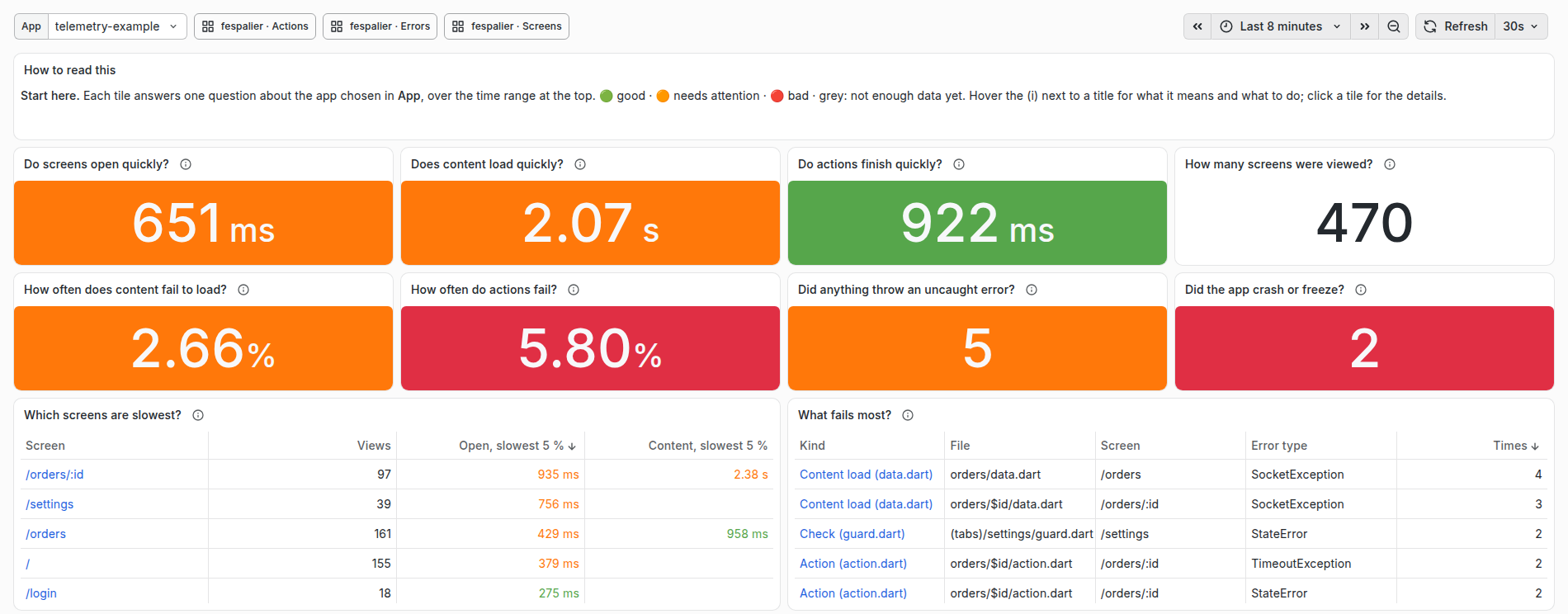
Since 0.8.1. fsp telemetry starts a stack on your computer that receives fespalier's telemetry (spans for navigations, guards, data.dart loads, actions and deferred loads) and shows four ready-made dashboards. They are written as the questions an app developer asks ("Do screens open quickly?", "How often do actions fail?"), not as metrics.
The stack is an OpenTelemetry collector, OpenObserve and, with --grafana, Grafana with the same dashboards. It needs Docker with Compose 2.20 or later, and runs in any folder, with or without a project: the stack belongs to you, not to one app.
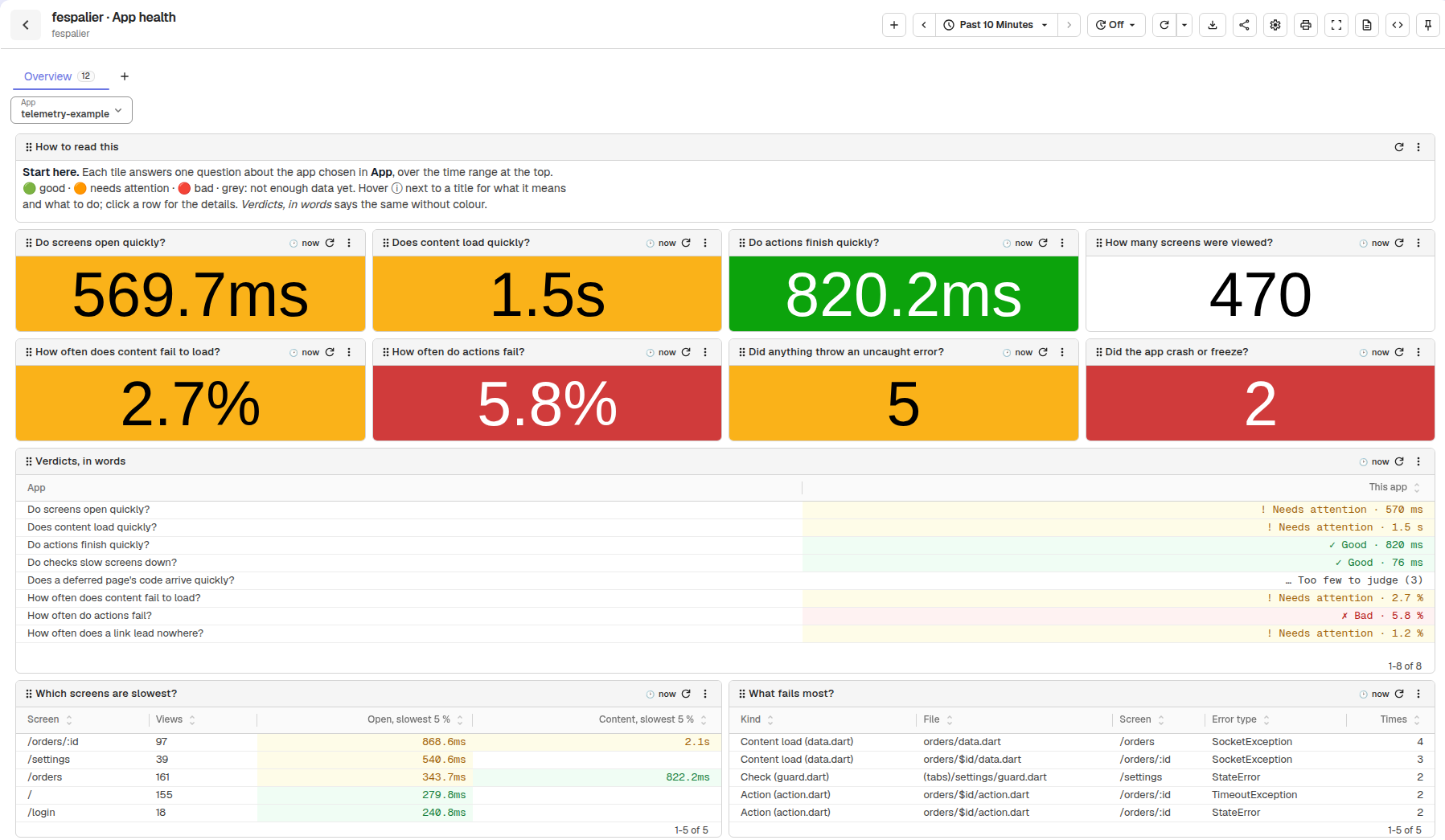
Sample data from scripts/telemetry/seed.py --showcase.
fsp telemetry            # the first run pulls about 1.2 GB of images; later runs take a few seconds
flutter run # any device: an emulator, a simulator, desktop, Chrome✓ telemetry stack running: 4 dashboards in OpenObserve, folder fespalier; start with fespalier · App health
OpenObserve http://localhost:5080 [email protected] / Fespalier-local-1
OTLP http://localhost:4318 (HTTP), localhost:4317 (gRPC)
The app FespalierOtel.endpoint() reaches it from an emulator, a simulator, desktop and the webPrinting the password is deliberate: the stack is local, the password is the documented default, and the web UIs listen on 127.0.0.1 only.
The app side
The only telemetry-specific value in the app is where it sends to. FespalierOtel.endpoint() (in package:fespalier_otel) is that value for a development build:
final observability = OtelZone(
  OtelZoneConfig(serviceName: 'shop', endpoint: FespalierOtel.endpoint()),
);
Since 0.19.0, otel: true writes that OtelZone for you, in the generated main() (OpenTelemetry from the generated main()), with the same endpoint.
It returns, in this order:
- what
--dart-define=OTEL_EXPORTER_OTLP_ENDPOINT=...(or--dart-define-from-file) says, when it says anything; ''in a release build, sootel_zoneleaves telemetry off and a store build never sends to a developer's laptop;http://10.0.2.2:4318on Android (not the web), the emulator's name for its host;http://localhost:4318everywhere else: the iOS simulator, desktop and the web.
| Where the app runs | What reaches the stack |
|---|---|
| Android emulator | Nothing to do: 10.0.2.2. |
| iOS simulator | Nothing to do: localhost. |
| Desktop | Nothing to do: localhost. |
| Chrome | Nothing to do: localhost, with CORS (The web). |
| A phone on your Wi-Fi | fsp telemetry --lan, then flutter run --dart-define-from-file="$HOME/.fespalier/telemetry/dart-defines.json", or the path fsp telemetry --lan prints (it also covers cmd.exe and --dir). |
| An Android phone on USB | adb reverse tcp:4318 tcp:4318, then flutter run --dart-define=OTEL_EXPORTER_OTLP_ENDPOINT=http://localhost:4318. |
The port in endpoint() is 4318. If you changed FSP_OTLP_HTTP_PORT, pass the define.
The dashboards
Each dashboard has an App variable (the resource's service.name, so apps are told apart in one stack; it starts on the first app) and shows the last hour. They are in OpenObserve's folder fespalier, and in Grafana's, where App health is the home page.
- Every title is a question.
- Every panel has an ⓘ (Grafana: (i)) that says what it shows, what good looks like and which file to open when it is not.
- Every tile is green, amber or red (Reading the colours).
| Dashboard | Answers |
|---|---|
fespalier · App health | Start here. Eight tiles: Do screens open quickly? Does content load quickly? Do actions finish quickly? How many screens were viewed? How often does content fail to load? How often do actions fail? Did anything throw an uncaught error? Did the app crash or freeze? Then the same checks in words, the slowest screens, and what fails most. |
fespalier · Screens | Where people go and how fast each screen opens: its checks (guard.dart and redirect.dart), its content (data.dart) and its code (deferred pages), which screens are busiest, where people go next, and how often a link leads nowhere, how many loads were automatic retries, and how many showed saved content first. |
fespalier · Actions | What people do (each function in an action.dart): how many runs, how often they fail, how long they take, when, how many optimistic updates were undone, and how many runs validation stopped. |
fespalier · Errors | What broke, where and with which error: failed checks, loads, actions and code downloads, screen opens a failing check stopped (since 0.21.0), uncaught errors, native crashes and ANRs, and which screen each native crash happened on (since 0.19.0). |
The retry, saved-copy, undone and validation tiles and columns (since 0.18.0) read 0 for an app before 0.18.0, which sends none of those attributes.
A navigation that a failing guard stopped ends with the outcome error (since 0.21.0). The "link leads nowhere" tile does not count it, since the location matched a route. "How many operations failed?" counts it once, on the guard's span, and the navigation's own span is left out of the failure counts for the same reason. A guard that throws before it returns is seen only in the outcome, not as a failed check: the Errors dashboard's "Did a failing check stop a screen from opening?" tile counts the navigations that ended error, which includes it (the failure is also reported through FlutterError.onError, see When a guard fails).
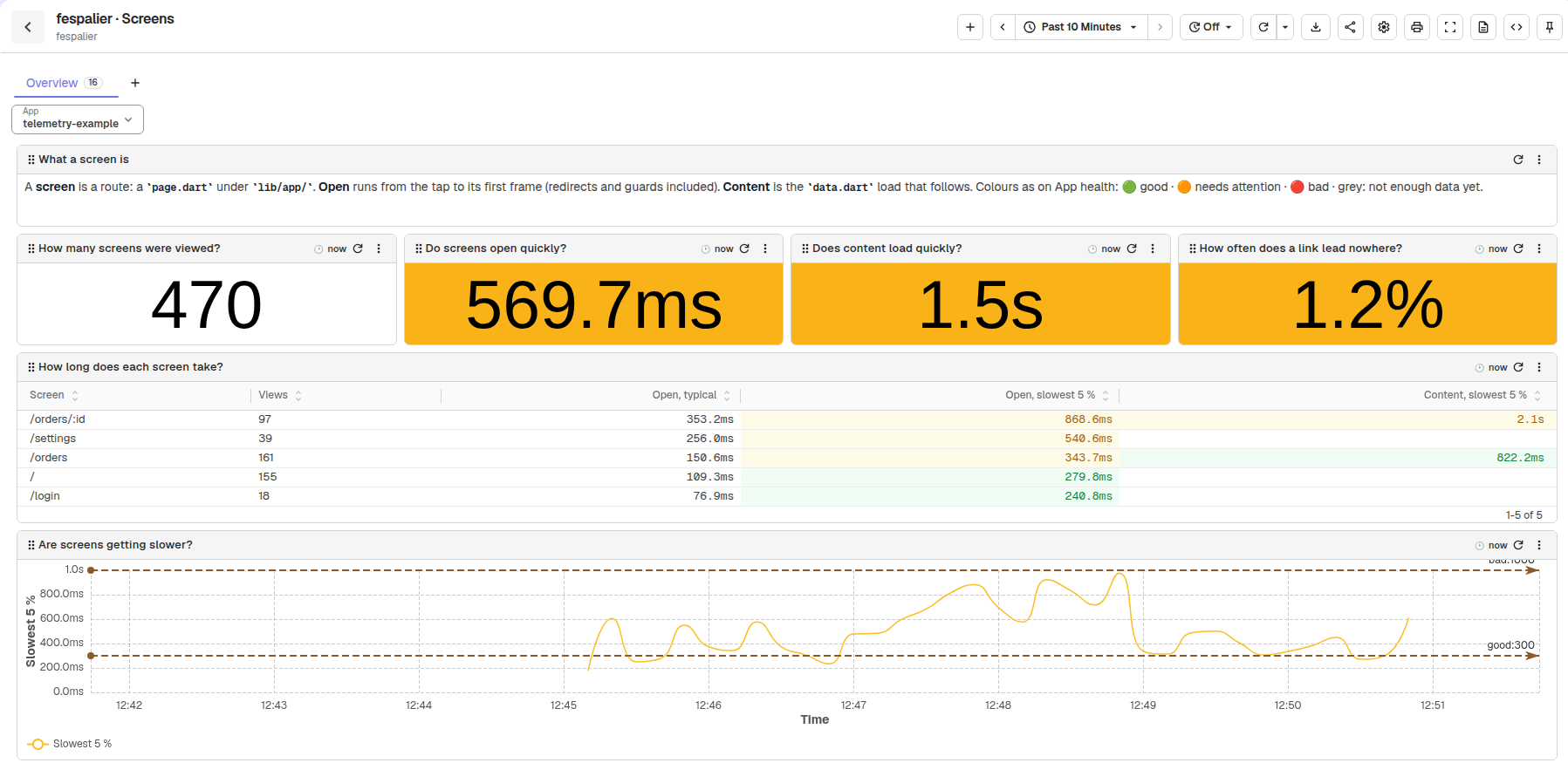
Sample data from scripts/telemetry/seed.py --showcase.
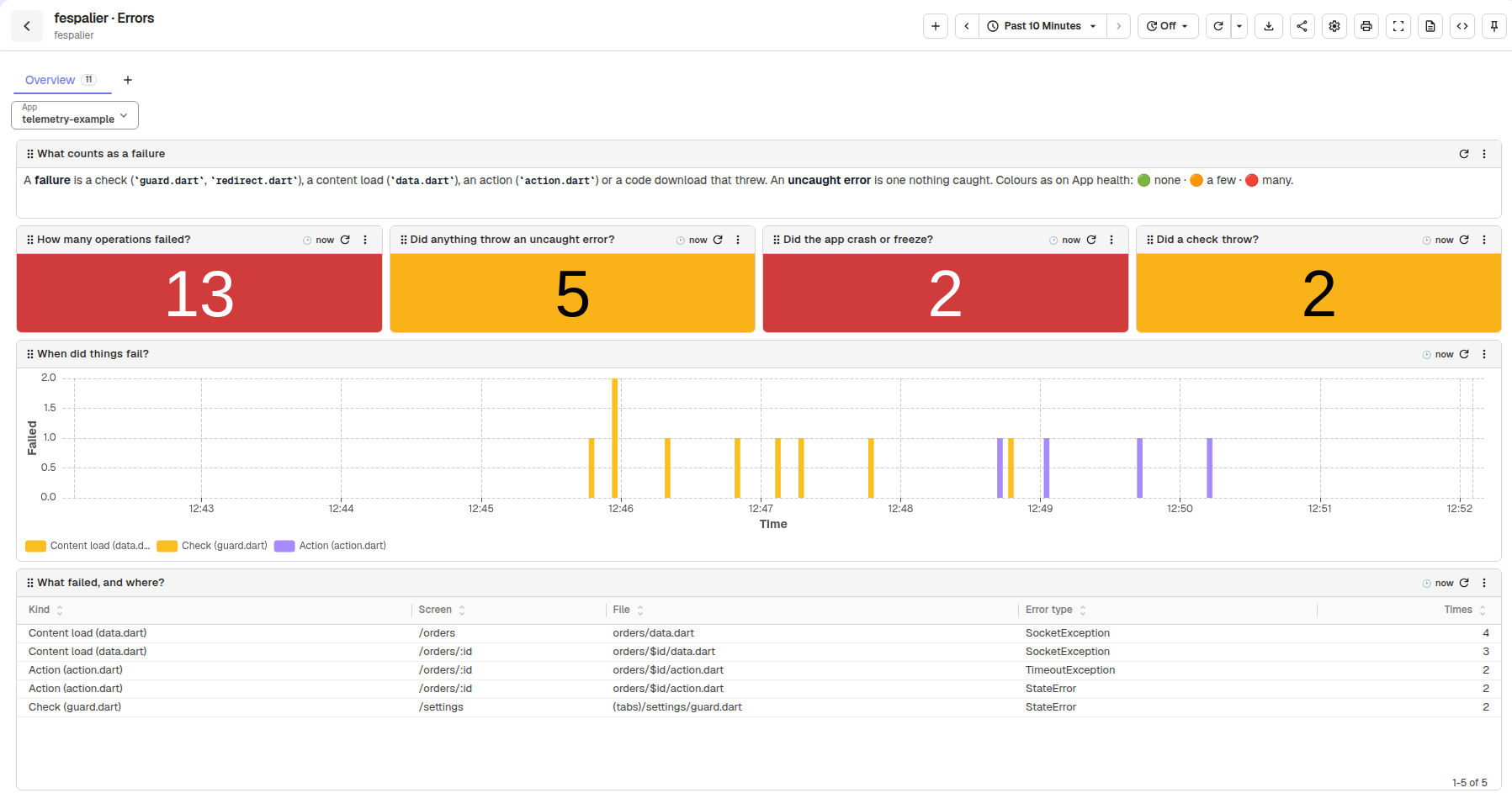
Sample data from scripts/telemetry/seed.py --showcase.
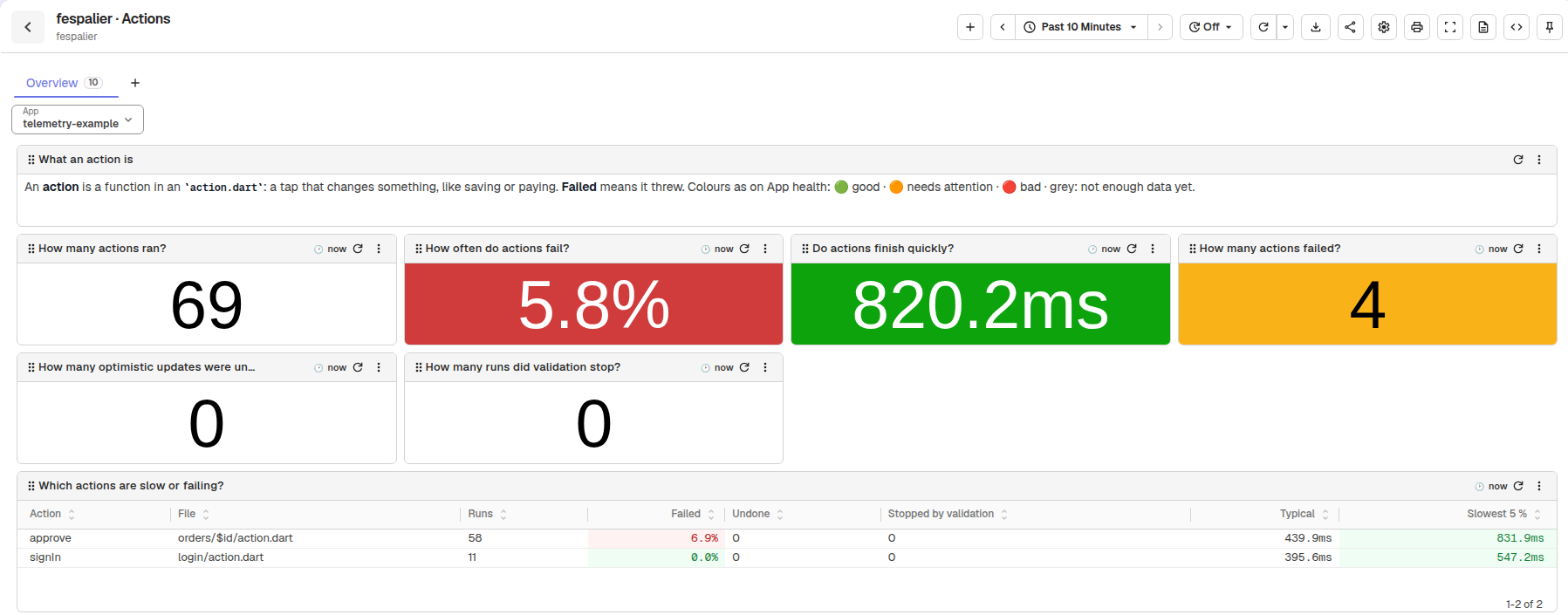
Sample data from scripts/telemetry/seed.py --showcase.
Click a row of a table in OpenObserve, or a tile in Grafana, to open the dashboard that explains it (the App and the time range come along).
Every query uses only the names of the telemetry conventions, which scripts/telemetry/build_dashboards.py reads from packages/fespalier_otel/lib/src/conventions.dart; a test (scripts/test_telemetry.py) fails when a query names anything else. Nothing is charted that fespalier does not emit.
Reading the colours
Since 0.8.1. A tile is green when the answer is good, amber when it needs attention and red when it is bad. "Slowest 5 %" is the time that 19 of 20 are faster than, so one slow outlier does not turn a tile red. The same limits colour the cells of the tables and draw the dashed lines in Are screens getting slower?. They are defaults for a mobile app, with a reason each:
| Measure | Good | Needs attention | Bad | Why |
|---|---|---|---|---|
Opening a screen (screen_open) | < 300 ms | 300–999 ms | ≥ 1000 ms | The span ends at the first frame, so it is the wait before anything moves. 300 ms is Material's screen-transition duration and the edge of "instant"; 1 s is Nielsen's limit for keeping the user's flow of thought. |
Loading a screen's content (content_load) | < 1000 ms | 1000–2999 ms | ≥ 3000 ms | The screen already shows loading.dart, so the user is waiting knowingly. 1 s keeps the flow; at 3 s more than half of mobile visitors give up. |
Finishing an action (action_time) | < 1000 ms | 1000–2999 ms | ≥ 3000 ms | The same reasoning for a tap that saves: past 1 s it needs a spinner, and past 3 s people tap again. |
A check before a screen (guard_wait) | < 100 ms | 100–299 ms | ≥ 300 ms | A check runs before the screen appears and adds to every open. 100 ms is "instant", and 300 ms would by itself spend the whole budget for opening a screen. |
A deferred page's code (code_download) | < 500 ms | 500–1999 ms | ≥ 2000 ms | Downloading a deferred page's code on the web: it should fit in a screen transition, and more than 2 s is a visible stall. |
A load or action that fails (failure_rate) | < 1 % | 1–4.9 % | ≥ 5 % | A 99 % success rate is the usual floor for user-facing calls, and Android's bad-behaviour line for crashes is about 1 %. At 5 %, one attempt in 20 fails. |
A link that leads nowhere (not_found_rate) | < 1 % | 1–4.9 % | ≥ 5 % | Typed routes cannot miss, so not-found comes from hand-built links, old deep links and typing on the web. A few are normal; 5 % is a broken link. |
Uncaught errors and failed operations (error_count) | 0 | 1–9 | ≥ 10 | While you develop, every uncaught error is worth a look, but a single one should not turn the page red. |
Native crashes and freezes (crash_count) | 0 | — | ≥ 1 | A native crash or an "app not responding" freeze is always bad. |
A tile that rests on fewer than 20 samples is grey and says Not enough data yet (and its row in Verdicts, in words says Too few to judge): below 20, a "slowest 5 %" is just the biggest value and a percentage jumps 5 % per event. Use the app a little longer, or widen the time range. Colour is never the only signal: OpenObserve's Verdicts, in words says each answer in words (Grafana cannot, because PromQL returns numbers), and each dashboard opens with a legend. To change a limit, edit the dashboard in OpenObserve (the importer then leaves it alone) or keep your own copy (Your own copy). The limits live in [thresholds] of scripts/telemetry/dashboards.toml, and a test fails when this table and that spec disagree.
The flags
| Command | What it does |
|---|---|
fsp telemetry | Writes the stack's files, runs docker compose up -d, waits for the dashboard importer to finish, and prints the addresses. |
fsp telemetry --grafana | Also starts Grafana at http://localhost:3000 (admin and the password in .env; anonymous visitors can view). |
fsp telemetry --lan | For phones: binds the OTLP ports (4317 and 4318) to every interface, for this run, and writes dart-defines.json with this computer's address. The web UIs stay on 127.0.0.1. |
fsp telemetry --report | Prints how each app is doing, in plain words, and exits: the stack must be running (A summary in the terminal). |
fsp telemetry --stop | Stops the stack and keeps its data. |
fsp telemetry --reset | Stops the stack and deletes its data (the OpenObserve and Grafana volumes). Use it after changing the OpenObserve password. |
fsp telemetry --dir <DIR> | Uses <DIR> instead of ~/.fespalier/telemetry (or FSP_TELEMETRY_DIR). |
fsp telemetry --no-start | Writes the files and prints the command that starts them; does not run Docker. |
Run from inside an app (or with --project), a start also checks that app: when its fespalier: section has telemetry off, which is the default, fsp telemetry prints ⚠ this app sends no fespalier spans yet: set `telemetry: true` under `fespalier:` in pubspec.yaml and install FespalierOtel (docs/observability.md, "Telemetry") after the import and before the summary, and still exits 0. It says nothing outside a project, and not for --no-start, --stop or --reset.
Where the files go. One folder per user, ~/.fespalier/telemetry (%USERPROFILE% on Windows), not into the app, so flutter clean cannot delete them. The Docker project name is fixed (fespalier-telemetry), so every app on your computer shares one stack. Running fsp telemetry again rewrites any file that differs (an upgrade of fsp upgrades the stack) and never touches .env. Since 0.21.0 it pins OpenObserve v1.1.2, which migrates its database on its first start: an fsp before 0.21.0 writes v1.0.4 back, and OpenObserve then restarts in a loop (Migration file of version '…' is missing), so on a computer whose apps use different versions of fsp, run fsp telemetry with the newest. Running the newer one again recovers it with the data kept; --reset is not needed.
Settings go in .env in that folder, written from env.example on the first run and never overwritten. Every value has the same default in compose.yaml, so the stack also runs with no .env at all, as docker compose up -d in that folder:
| Key | Default |
|---|---|
FSP_O2_EMAIL, FSP_O2_PASSWORD | [email protected], Fespalier-local-1 |
FSP_GRAFANA_PASSWORD | Fespalier-local-1 |
FSP_OTLP_HTTP_PORT, FSP_OTLP_GRPC_PORT | 4318, 4317 |
FSP_O2_PORT, FSP_GRAFANA_PORT | 5080, 3000 |
FSP_OTLP_BIND | 127.0.0.1 (--lan sets 0.0.0.0 for one run) |
FSP_OTLP_CORS_ORIGIN | http://localhost: one more browser origin allowed to send OTLP |
FSP_O2_WAIT | 180: seconds the dashboard importer waits for OpenObserve |
Passwords. OpenObserve refuses a weak root password and restarts forever: it needs 8 to 128 characters with a lowercase letter, an uppercase letter, a digit and a symbol. The root user is created on the first start only, so change the password in .env and then run fsp telemetry --reset.
Ports. A port that is taken is FSP_O2_PORT and the like in .env.
A summary in the terminal: --report
Since 0.8.1. fsp telemetry --report answers "how is my app doing?" without opening a browser. It runs inside the stack (the host needs no Python), asks OpenObserve the very questions App health asks, and prints one block per app that sent fespalier spans in the last hour:
fespalier · telemetry-example · last hour
  ✓ good               Do screens open quickly?                     240 ms
  ! needs attention    Does content load quickly?                   1.4 s
  ✓ good               Do actions finish quickly?                   310 ms
  ✓ good               Do checks slow screens down?                 60 ms
  … too few to judge   Does a deferred page's code arrive quickly?  4 samples
  ! needs attention    How often does content fail to load?         2.5 %
  ✗ bad                How often do actions fail?                   6.2 %
  ✓ good               How often does a link lead nowhere?          0.4 %
  ! needs attention    Did anything throw an uncaught error?        5
  ✗ bad                Did the app crash or freeze?                 2
  Slowest screen: /orders/:id, 1.2 s to open and 2.3 s for its content (slowest 5 %, 412 views)
  Fails most: Action (action.dart) orders/$id/action.dart on /orders/:id, 3 × StateError
  Details: http://localhost:5080, Dashboards, folder fespalier, fespalier · App health
The mark and the word are the colour, in words. The SQL is read from the generated App health dashboard, so the report and the dashboard cannot disagree, and the limits are the same. none stands for a count of zero, and with nothing failed the "Fails most" line is Nothing failed.. Three messages:
fsp telemetry --report needs the stack running: start it with `fsp telemetry`when OpenObserve is not running.no fespalier spans in the last hour: is the app running, with telemetry: true and FespalierOtel installed? (docs/observability.md, "Telemetry")when no app sent a span (exit code 0).fespalier: the report's query failed: HTTP <status>: <body>when OpenObserve answered with an error (exit code 1), andthe report failed (exit <n>); the lines above say whywhen the report stopped for another reason.
The web and otel_zone
A web app posts OTLP/HTTP to the collector from another origin (http://localhost:<port> to http://localhost:4318), which needs CORS: the collector allows http://localhost:* and http://127.0.0.1:*, plus FSP_OTLP_CORS_ORIGIN. A page served over https cannot post to http://localhost (mixed content); use flutter run -d chrome in development.
otel_zone's runGuarded runs its body on the web since v0.8.1. Before it (checked with otel_zone v0.5.0), the zone opened a ReceivePort from dart:isolate ahead of the body, which the web does not have, and the zone's own handler swallowed the error: the app stayed blank and nothing was printed. start() works on the web either way. With otel: true the generated main() wraps the app in the zone on the web too (its observability is AppMain.observability), so that app's fix is to bump otel_zone to v0.8.1. The snippet below is for an app wired by hand on an older otel_zone, which must not use the zone on the web:
Future<void> zone(Future<void> Function() body) {
  if (kIsWeb) return body();
  return observability.runGuarded(body);
}
OpenObserve and Grafana show the same numbers
One spec, scripts/telemetry/dashboards.toml, generates both: fsp embeds the results, and CI fails when they are stale. OpenObserve's panels are SQL over the raw spans and logs; Grafana's are PromQL over metrics that the collector derives from the same spans (and Grafana reads them from OpenObserve, so there is no Prometheus, Tempo or Loki). Counts are identical, which the smoke test asserts. These differ:
- Grafana's percentiles are interpolated within histogram buckets (1, 2, 5, 10, 16, 33, 50, 100, 250, 500 ms, 1, 2.5, 5, 10 s); OpenObserve's are computed from the raw durations.
- Span metrics are stamped when the collector receives a span. A batch that a phone replays later counts at the time it arrives in Grafana, and at its own time in OpenObserve.
- Grafana has no error messages or trace ids: its What failed last? is a count table with a link to OpenObserve, and What was uncaught last? exists in OpenObserve only. Verdicts, in words and Where do people go next? exist in OpenObserve only too.
- The percentage tiles agree (the smoke test compares them within 0.05), and a tile that rests on fewer than 20 samples says Not enough data yet in both. Since 0.21.0 the percentage tiles agree also when every call failed (before, Grafana's tile said Not enough data yet).
- Grafana shows no words for the colours, because PromQL cannot return a sentence.
Sample data from scripts/telemetry/seed.py --showcase.
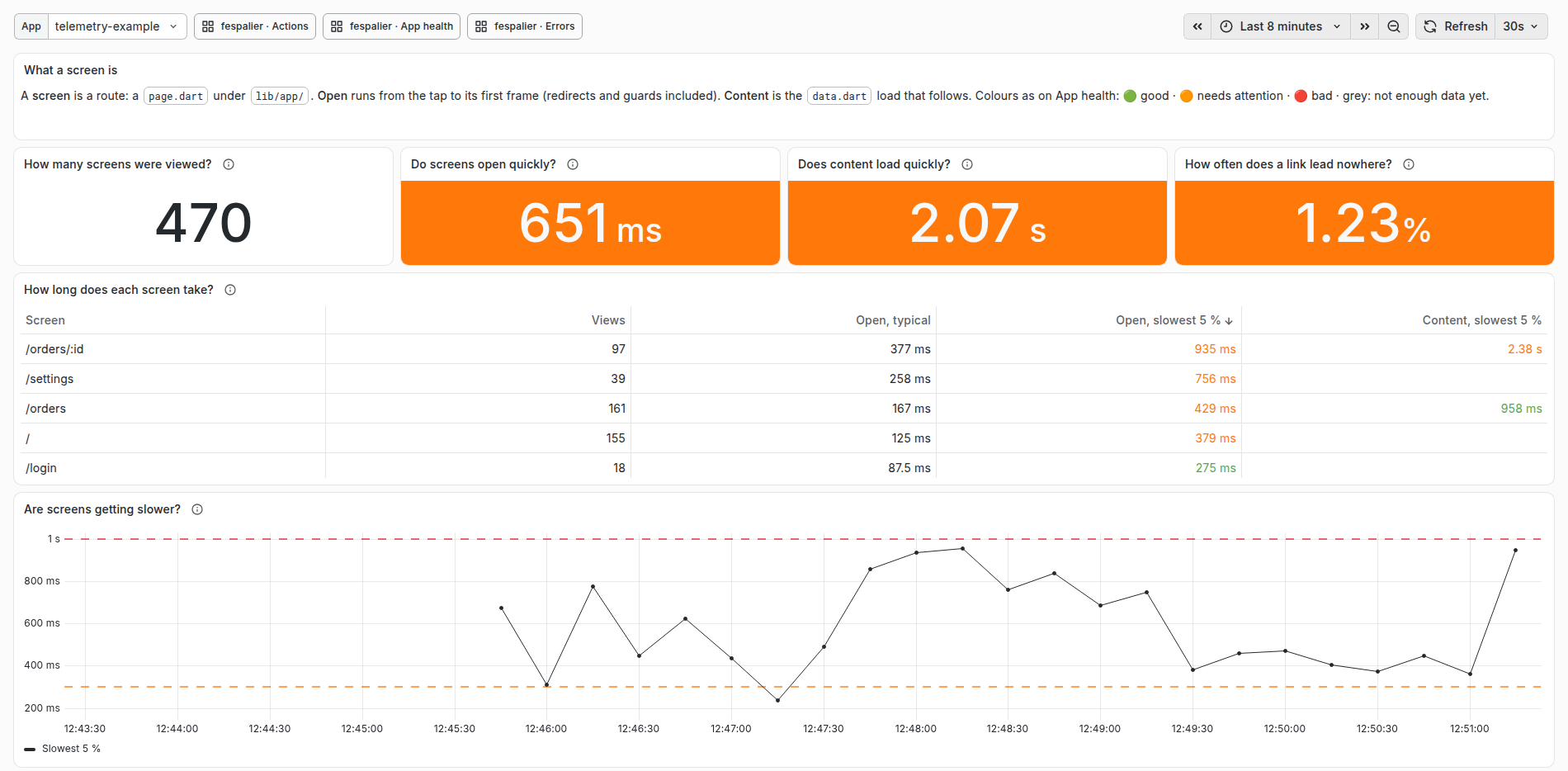
Sample data from scripts/telemetry/seed.py --showcase.
Your own copy
fsp telemetry --no-start --dir ops/telemetry writes the stack where you want it, for a team that wants to commit or change it. The folder cli/templates/telemetry/ in the fespalier repository is the same stack and runs as it is (docker compose up -d in it). The collector file's span_metrics and count blocks are what to copy into a production collector.
- A dashboard that someone edited in OpenObserve is left alone when a new
fspbrings a new version (the importer says so; delete the dashboard to get ours back). - Grafana's dashboards are read-only (provisioned): save a copy to change one.
- A dashboard that a newer
fspno longer ships is deleted from OpenObserve when nobody edited it, and Grafana drops its file;fsp telemetrydeletes the stale files in its folder too.
Images are pinned by tag and digest (collector 0.163.1, OpenObserve v1.1.2, Grafana 13.2.4), for amd64 and arm64. The collector comes from ghcr.io, the rest from mirror.gcr.io, Google's mirror of Docker Hub (the same images and digests), so a pull does not count against the anonymous limits of Docker Hub or Amazon ECR Public, which a shared network or a CI runner can exhaust.